Use Ansible to create and tag Instances in AWS (EC2)
Use Ansible to create and tag Instances in AWS (EC2)
Original post from linux.xvx.cz
It may be handy to quickly create a few instances for testing in AWS.
For such a case I’m using a simple Ansible playbook which can deploy a few CentOS 7 instances, configure disks, tags volumes and instances and install public ssh key to root for example.
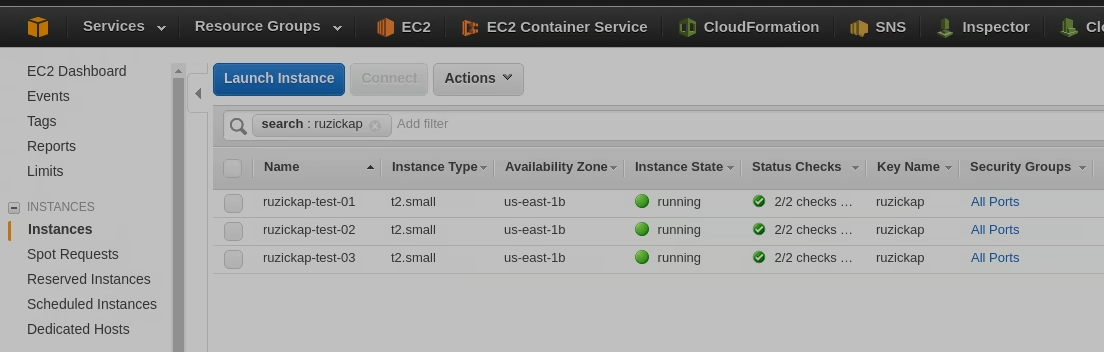 AWS Console
Here is the playbook:
1
2
3
4
5
6
7
8
9
10
11
12
13
14
15
16
17
18
19
20
21
22
23
24
25
26
27
28
29
30
31
32
33
34
35
36
37
38
39
40
41
42
43
44
45
46
47
48
49
50
51
52
53
54
55
56
57
58
59
60
61
62
63
64
65
66
67
68
69
70
71
72
73
74
75
76
77
78
79
80
81
82
83
84
85
86
87
88
89
90
91
92
93
94
95
96
97
98
99
100
101
102
103
104
105
106
107
108
109
110
111
112
113
114
115
116
117
118
119
120
121
122
123
124
125
126
127
128
129
130
131
132
133
134
135
136
137
138
139
140
141
142
143
144
145
146
147
148
149
150
151
152
153
154
155
156
157
158
159
160
161
162
163
164
165
166
167
168
169
---
- name: Create Instance in AWS
  hosts: localhost
  connection: local
  gather_facts: false

  vars:
    aws_access_key: "xxxxxx"
    aws_secret_key: "xxxxxx"
    security_token: "xxxxxx"
    aws_instance_type: "t2.nano"
    aws_region: "us-east-1"
    aws_security_group: "All Ports"
    aws_ami_owner: "099720109477"
    aws_key_name: "ruzickap"
    aws_instance_initiated_shutdown_behavior: "terminate"
    aws_instances_count: 3
    site_name: "ruzickap-test"
    aws_tags:
      Name: "{{ site_name }}"
      Application: "{{ site_name }}"
      Environment: "Development"
      Costcenter: "1xxxxxxx3"
      Division: "My"
      Consumer: "petr.ruzicka@gmail.com"

  tasks:
    - name: Search for the latest CentOS AMI
      shell: aws ec2 describe-images --region {{ aws_region }} --owners aws-marketplace --output text --filters "Name=product-code,Values=aw0evgkw8e5c1q413zgy5pjce" "Name=virtualization-type,Values=hvm" --query 'sort_by(Images, &CreationDate)[-1].[ImageId]' --output 'text'
      changed_when: False
      register: centos_ami_id

    - name: Get Private Subnets in VPC
      ec2_vpc_subnet_facts:
        aws_access_key: "{{ ec2_access_key }}"
        aws_secret_key: "{{ ec2_secret_key }}"
        security_token: "{{ access_token }}"
        region: "{{ aws_region }}"
        filters:
          "tag:Type": Private
      register: ec2_vpc_subnet_facts

    - debug: "msg='name: {{ ec2_vpc_subnet_facts.subnets[0].tags.Name }} | subnet_id: {{ ec2_vpc_subnet_facts.subnets[0].id }} | cidr_block: {{ ec2_vpc_subnet_facts.subnets[0].cidr_block }} | region: {{ aws_region }}'"

    - name: Create an EC2 instance
      ec2:
        aws_access_key: "{{ ec2_access_key }}"
        aws_secret_key: "{{ ec2_secret_key }}"
        security_token: "{{ access_token }}"
        region: "{{ aws_region }}"
        key_name: "{{ aws_key_name }}"
        instance_type: "{{ aws_instance_type }}"
        image: "{{ centos_ami_id.stdout }}"
        instance_tags: "{{ aws_tags }}"
        user_data: |
          #!/bin/bash
          echo "Defaults:centos !requiretty" > /etc/sudoers.d/disable_requiretty
          yum upgrade -y yum
        wait: yes
        exact_count: "{{ aws_instances_count }}"
        count_tag:
          Application: "{{ aws_tags.Application }}"
        group: "{{ aws_security_group }}"
        vpc_subnet_id: "{{ ec2_vpc_subnet_facts.subnets[0].id }}"
        instance_initiated_shutdown_behavior: "{{ aws_instance_initiated_shutdown_behavior }}"
        volumes:
          - device_name: /dev/sda1
            volume_type: gp2
            volume_size: 9
            delete_on_termination: true
          - device_name: /dev/sdb
            volume_type: standard
            volume_size: 1
            delete_on_termination: true
      register: ec2_instances

    - block:
      - name: Set name tag for AWS instances
        ec2_tag:
          aws_access_key: "{{ ec2_access_key }}"
          aws_secret_key: "{{ ec2_secret_key }}"
          security_token: "{{ access_token }}"
          region: "{{ aws_region }}"
          resource: "{{ item.1.id }}"
          tags:
            Name: "{{ aws_tags.Name }}-{{ '%02d' | format(item.0 + 1) }}"
        with_indexed_items: "{{ ec2_instances.instances }}"
        loop_control:
          label: "{{ item.1.id }} - {{ aws_tags.Name }}-{{ '%02d' | format(item.0 + 1) }}"

      - name: Get volumes ids
        ec2_vol:
          aws_access_key: "{{ ec2_access_key }}"
          aws_secret_key: "{{ ec2_secret_key }}"
          security_token: "{{ access_token }}"
          region: "{{ aws_region }}"
          instance: "{{ item }}"
          state: list
        with_items: "{{ ec2_instances.instance_ids }}"
        register: ec2_instances_volumes
        loop_control:
          label: "{{ item }}"

      - name: Tag volumes
        ec2_tag:
          aws_access_key: "{{ ec2_access_key }}"
          aws_secret_key: "{{ ec2_secret_key }}"
          security_token: "{{ access_token }}"
          region: "{{ aws_region }}"
          resource: "{{ item.1.id }}"
          tags: "{{ aws_tags | combine({'Instance': item.1.attachment_set.instance_id}, {'Device': item.1.attachment_set.device}) }}"
        with_subelements:
          - "{{ ec2_instances_volumes.results }}"
          - volumes
        loop_control:
          label: "{{ item.1.id }} - {{ item.1.attachment_set.device }}"

      - name: Wait for SSH to come up
        wait_for: host={{ item.private_ip }} port=22 delay=60 timeout=320 state=started
        with_items: '{{ ec2_instances.instances }}'
        loop_control:
          label: "{{ item.id }} - {{ item.private_ip }}"

      when: ec2_instances.changed

    - name: Gather EC2 facts
      ec2_remote_facts:
        aws_access_key: "{{ ec2_access_key }}"
        aws_secret_key: "{{ ec2_secret_key }}"
        security_token: "{{ access_token }}"
        region: "{{ aws_region }}"
        filters:
          instance-state-name: running
          "tag:Application": "{{ site_name }}"
      register: ec2_facts

    - name: Add AWS hosts to groups
      add_host:
        name: "{{ item.tags.Name }}"
        ansible_ssh_host: "{{ item.private_ip_address }}"
        groups: ec2_hosts
        site_name: "{{ site_name }}"
      changed_when: false
      with_items: "{{ ec2_facts.instances }}"
      loop_control:
        label: "{{ item.id }} - {{ item.private_ip_address }} - {{ item.tags.Name }}"


- name: Install newly created machines
  hosts: ec2_hosts
  any_errors_fatal: true
  remote_user: centos
  become: yes

  tasks:
    - name: Set hostname
      hostname: name={{ inventory_hostname }}

    - name: Build hosts file
      lineinfile: dest=/etc/hosts regexp='{{ item }}' line="{{ hostvars[item].ansible_default_ipv4.address }} {{ item }}"
      when: hostvars[item].ansible_default_ipv4.address is defined
      with_items: "{{ groups['ec2_hosts'] }}"

    - name: Add SSH key to root
      authorized_key: user=root key="{{ lookup('file', item) }}"
      with_items:
        - ~/.ssh/id_rsa.pub
      tags:
        - ssh_keys
You can easily run it using:
1
ansible-playbook -i "127.0.0.1," site_aws.yml
I hope some parts will be handy…
Enjoy :-)
This post is licensed under CC BY 4.0 by the author.