Turris - OpenWrt configuration
Turris - OpenWrt configuration
Original post from linux.xvx.cz
You can find some details about the Turris wifi router, lots of photos and some command outputs in my previous blog post “Turris - The Open Enterprise Wi-Fi Router”. Now I would like to describe how I configured it according to the network diagram:
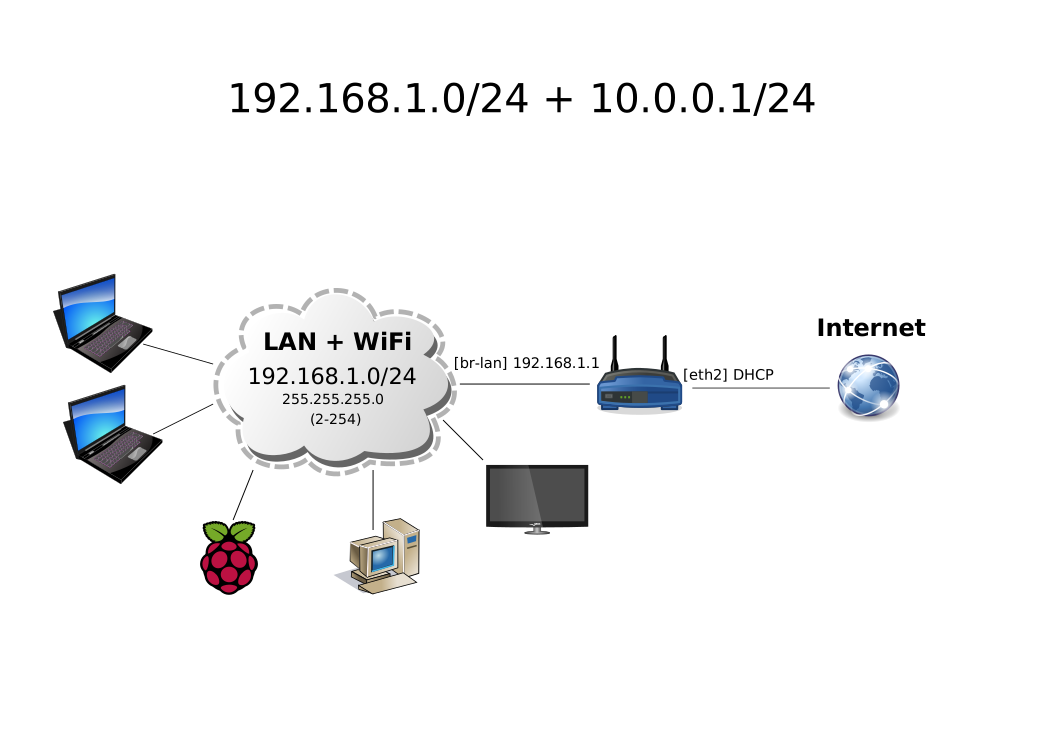
I will also need my own web pages, transmission torrent client, microsd card, Dynamic DNS and extend the luci interface to add some more stats + graphs. Here are the steps. There is no guarantee it will work for another Turris router.
System + firewall changes:
1
2
3
4
5
6
7
8
9
10
11
12
13
14
15
16
17
18
19
20
#Configure ssh key autologin:
ssh-copy-id -i ~/.ssh/id_rsa root@192.168.1.1

uci set system.@system[0].hostname=gate
uci add_list sshd.@openssh[0].Port=2222

uci add firewall rule
uci set firewall.@rule[-1].name=ssh
uci set firewall.@rule[-1].src=wan
uci set firewall.@rule[-1].target=ACCEPT
uci set firewall.@rule[-1].proto=tcp
uci set firewall.@rule[-1].dest_port=2222

uci add firewall redirect
uci set firewall.@redirect[-1].name=ssh_lan
uci set firewall.@redirect[-1].src=lan
uci set firewall.@redirect[-1].proto=tcp
uci set firewall.@redirect[-1].src_dport=22
uci set firewall.@redirect[-1].dest_port=2222
uci set firewall.@redirect[-1].dest_ip=192.168.1.1
Format and mount MicroSD card:
1
2
3
4
5
6
7
8
9
10
11
mkdir /data

mkfs.ext4 -L data /dev/mmcblk0p1

uci add fstab mount
uci set fstab.@mount[-1].device=/dev/mmcblk0p1
uci set fstab.@mount[-1].target=/data
uci set fstab.@mount[-1].fstype=ext4
uci set fstab.@mount[-1].options=rw,sync,noatime,nodiratime
uci set fstab.@mount[-1].enabled=1
uci set fstab.@mount[-1].enabled_fsck=0
Wifi configuration (I got much better speed than with the default settings):
1
2
3
4
5
6
7
8
9
uci set wireless.radio0.channel=8
uci set wireless.radio0.htmode=HT40-
uci set wireless.radio0.noscan=1
uci set wireless.radio0.bursting=1
uci set wireless.radio0.ff=1
uci set wireless.radio0.compression=1
uci set wireless.radio0.xr=1
uci set wireless.radio0.ar=1
uci set wireless.radio0.txpower=20
Change DHCP settings:
1
2
3
4
5
6
7
8
9
10
11
12
13
14
15
16
17
18
19
20
21
22
23
24
25
26
27
28
29
30
31
32
33
34
35
36
37
38
39
40
41
42
43
44
45
46
47
48
49
50
51
52
53
54
55
56
57
58
59
60
61
62
63
64
65
66
67
68
69
70
71
72
73
74
75
76
77
78
79
80
81
82
83
84
85
86
87
88
89
90
91
92
uci set dhcp.lan.start=200
uci set dhcp.lan.limit=54

uci set dhcp.@dnsmasq[0].domain=xvx.cz
uci set dhcp.@dnsmasq[0].leasefile=/etc/dnsmasq-dhcp.leases

#Send email for new connections:
echo "dhcp-script=/etc/dnsmasq-script.sh" >> /etc/dnsmasq.conf

cat > /etc/dnsmasq-script.sh << \EOF
#!/bin/sh

/bin/echo $(/bin/date +"%F %T") $* >> /etc/dnsmasq.script.log

if [ "$1" == "add" ] && ! grep -iq "$2" /etc/config/dhcp; then
  echo -e "Subject: New MAC on $(uci get system.@system[0].hostname).$(uci get dhcp.@dnsmasq[0].domain)\\n\\n$(/bin/date +"%F %T") $*" | sendmail petr.ruzicka@gmail.com
fi
EOF

chmod a+x /etc/dnsmasq-script.sh

# WiFi
uci add dhcp host
uci set dhcp.@host[-1].name=peru-nb-work-wifi
uci set dhcp.@host[-1].ip=192.168.1.2
uci set dhcp.@host[-1].mac=5c:51:4f:7e:e0:d2

uci add dhcp host
uci set dhcp.@host[-1].name=andy-nb-wifi
uci set dhcp.@host[-1].ip=192.168.1.3
uci set dhcp.@host[-1].mac=74:f0:6d:93:c7:3a

uci add dhcp host
uci set dhcp.@host[-1].name=peru-nb-old-wifi
uci set dhcp.@host[-1].ip=192.168.1.4
uci set dhcp.@host[-1].mac=00:15:00:11:48:5A

uci add dhcp host
uci set dhcp.@host[-1].name=andy-android-wifi
uci set dhcp.@host[-1].ip=192.168.1.5
uci set dhcp.@host[-1].mac=00:23:76:D6:42:C7

uci add dhcp host
uci set dhcp.@host[-1].name=peru-android-work-wifi
uci set dhcp.@host[-1].ip=192.168.1.6
uci set dhcp.@host[-1].mac=a4:eb:d3:44:7a:23

uci add dhcp host
uci set dhcp.@host[-1].name=peru-palm-wifi
uci set dhcp.@host[-1].ip=192.168.1.7
uci set dhcp.@host[-1].mac=00:0b:6c:57:da:9a

uci add dhcp host
uci set dhcp.@host[-1].name=RTL8187-wifi
uci set dhcp.@host[-1].ip=192.168.1.8
uci set dhcp.@host[-1].mac=00:C0:CA:54:F5:BA

uci add dhcp host
uci set dhcp.@host[-1].name=peru-tablet-wifi
uci set dhcp.@host[-1].ip=192.168.1.9
uci set dhcp.@host[-1].mac=00:22:f4:f6:f3:0b

# NIC
uci add dhcp host
uci set dhcp.@host[-1].name=peru-nb-work-nic
uci set dhcp.@host[-1].ip=192.168.1.130
uci set dhcp.@host[-1].mac=28:d2:44:31:31:90

uci add dhcp host
uci set dhcp.@host[-1].name=andy-nb-nic
uci set dhcp.@host[-1].ip=192.168.1.131
uci set dhcp.@host[-1].mac=20:cf:30:31:da:b3

uci add dhcp host
uci set dhcp.@host[-1].name=peru-nb-old-nic
uci set dhcp.@host[-1].ip=192.168.1.132
uci set dhcp.@host[-1].mac=00:13:D4:D1:03:57

uci add dhcp host
uci set dhcp.@host[-1].name=peru-tv-nic
uci set dhcp.@host[-1].ip=192.168.1.133
uci set dhcp.@host[-1].mac=00:12:FB:94:1B:9A

uci add dhcp host
uci set dhcp.@host[-1].name=raspberrypi-nic
uci set dhcp.@host[-1].ip=192.168.1.134
uci set dhcp.@host[-1].mac=b8:27:eb:8c:97:9e

uci add dhcp host
uci set dhcp.@host[-1].name=server-nic
uci set dhcp.@host[-1].ip=192.168.1.135
uci set dhcp.@host[-1].mac=00:1f:c6:e9:f5:14
Set my favorite led colors:
1
2
3
4
5
6
7
8
9
10
11
12
13
14
15
uci set rainbow.wifi=led
uci set rainbow.@led[-1].color=blue
uci set rainbow.@led[-1].status=auto

uci set rainbow.pwr=led
uci set rainbow.@led[-1].color=red
uci set rainbow.@led[-1].status=auto

uci set rainbow.lan=led
uci set rainbow.@led[-1].color=green
uci set rainbow.@led[-1].status=auto

uci set rainbow.wan=led
uci set rainbow.@led[-1].color=FFFF00
uci set rainbow.@led[-1].status=auto
Add favorite packages and configure Midnight Commander, screen and email.
1
2
3
4
5
6
7
8
9
10
11
12
13
14
15
16
17
18
19
20
21
22
23
24
25
26
27
28
29
30
31
32
33
34
35
36
37
38
39
40
41
42
43
44
45
46
47
48
49
50
51
52
53
opkg install bash bind-dig diffutils digitemp dstat file htop kmod-usb-serial-pl2303 less lftp lsof mc mtr nmap rsync screen ssmtp sudo tcpdump

#File highlighting in "mc"
mkdir -p /usr/lib/mc/extfs.d
touch /etc/mc/sfs.ini

wget --no-check-certificate https://raw.github.com/MidnightCommander/mc/master/misc/filehighlight.ini -O /etc/mc/filehighlight.ini

#Favorite "mc" settings
mkdir -p /etc/skel/.mc/
chmod 700 /etc/skel/.mc
cat > /etc/skel/.mc/ini << EOF
[Midnight-Commander]
auto_save_setup=0
drop_menus=1
use_internal_edit=1
confirm_exit=0

[Layout]
menubar_visible=0
message_visible=0
EOF
cp -r /etc/skel/.mc /root/

#Disable mouse + path "changer"
wget --no-check-certificate https://raw.github.com/MidnightCommander/mc/master/contrib/mc-wrapper.sh.in -O - | sed 's|@bindir@/mc|/usr/bin/mc --nomouse|' > /usr/bin/mc-wrapper.sh
chmod a+x /usr/bin/mc-wrapper.sh
echo "[ -x /usr/bin/mc-wrapper.sh ] && alias mc='. /usr/bin/mc-wrapper.sh'" >> /etc/profile

#Screen settings
cat >> /etc/screenrc << EOF
defscrollback 1000
termcapinfo xterm ti@:te@
hardstatus alwayslastline '%{= kG}[ %{G}%H %{g}][%= %{= kw}%?%-Lw%?%{r}(%{W}%n*%f%t%?(%u)%?%{r})%{w}%?%+Lw%?%?%= %{g}][%{B} %d/%m %{W}%c %{g}]'
vbell off
EOF

#Prompt colors
sed -i 's/^export PS1.*/export PS1='\''\\\[\\033\[01;31m\\\]\\h\\\[\\033\[01;34m\\\] \\w #\\\[\\033\[00m\\\] '\''/' /etc/profile

#Make outgoing emails to reach the SMTP server:
sed -i "s/^mailhub=.*/mailhub=mail.upcmail.cz/;s/^rewriteDomain=.*/rewriteDomain=xvx.cz/;s/^hostname.*/hostname=$(uci get system.@system[0].hostname).$(uci get dhcp.@dnsmasq[0].domain)/" /etc/ssmtp/ssmtp.conf

#Reboot email
# shellcheck disable=SC2016 # Single quotes intentional - backticks expand on router, not locally
sed -i '/^exit 0/i echo -e "Subject: Reboot `uci get system.@system[0].hostname`.`uci get dhcp.@dnsmasq[0].domain`\\n\\nOpenwrt rebooted: `date; uptime`\\n" | sendmail petr.ruzicka@gmail.com' /etc/rc.local

#Disable IPv6 in Unbound (and flooding the logs by ipv6 error messages)
uci add_list unbound.@unbound[-1].include_path=/etc/unbound/unbound_include
cat > /etc/unbound/unbound_include << EOF
server:
        do-ip6: no
EOF
Configure the DDNS - duckdns.org:
1
2
3
4
5
6
7
8
9
10
11
12
uci set ddns.myddns.enabled=1
uci set ddns.myddns.service_name=duckdns.org
uci set ddns.myddns.domain=gate
uci set ddns.myddns.username=NA
uci set ddns.myddns.password=xxxxxxx-xxxx-xxxx-xxxx-xxxxxxxxxxxx
uci set ddns.myddns.ip_source=network
uci set ddns.myddns.ip_network=wan
uci set ddns.myddns.force_interval=72
uci set ddns.myddns.force_unit=hours
uci set ddns.myddns.check_interval=10
uci set ddns.myddns.check_unit=minutes
uci set 'ddns.myddns.update_url=http://www.duckdns.org/update?domains=[DOMAIN]&token=[PASSWORD]&ip=[IP]'
Modify the lighttpd web server to enable ssl (https), serve personal pages and Transmission:
1
2
3
4
5
6
7
8
9
10
11
12
13
14
15
16
17
18
19
20
21
22
23
24
25
26
27
28
29
30
31
32
33
34
35
36
37
38
39
40
41
42
43
44
45
46
47
48
49
50
51
52
53
54
55
56
57
58
59
60
61
62
63
64
65
66
67
68
69
70
71
72
73
74
75
opkg install lighttpd-mod-proxy
#See the http://192.168.1.1/myadmin/ for main "myadmin" page
mkdir -p /www3/myadmin/transmission-web
mkdir -p /www3/myadmin/luci

cp /etc/foris/foris-lighttpd-inc.conf /etc/foris/foris-lighttpd-inc.conf.orig
cp /etc/lighttpd/lighttpd.conf /etc/lighttpd/lighttpd.conf.orig

#Let foris "listen" only on 192.168.1.1
#sed -i "s@\$HTTP\[\"url\"\] !~ \"\^/static\" {.*@\$HTTP\[\"host\"\] == \"192\\.168\\.1\\.1\" {@" /etc/foris/foris-lighttpd-inc.conf
sed -i "/\$HTTP\[\"url\"\] !~ .*/i \$HTTP\[\"host\"\] == \"192\\.168\\.1\\.1\" {" /etc/lighttpd/conf.d/foris.conf
echo "}" >> /etc/lighttpd/conf.d/foris.conf
#Change httpd root to my own
sed -i 's/www2/www3/' /etc/lighttpd/lighttpd.conf

wget --no-check-certificate https://raw.github.com/ruzickap/medlanky.xvx.cz/gh-pages/index.html -O - | sed 's@facebook.com/medlanky@xvx.cz@g;s/UA-6594742-7/UA-6594742-8/' > /www3/index.html

uci add firewall rule
uci set firewall.@rule[-1].name=https
uci set firewall.@rule[-1].src=wan
uci set firewall.@rule[-1].target=ACCEPT
uci set firewall.@rule[-1].proto=tcp
uci set firewall.@rule[-1].dest_port=443

uci add firewall rule
uci set firewall.@rule[-1].name=http
uci set firewall.@rule[-1].src=wan
uci set firewall.@rule[-1].target=ACCEPT
uci set firewall.@rule[-1].proto=tcp
uci set firewall.@rule[-1].dest_port=80

#Enable SSL (https)
mkdir -p /etc/lighttpd/ssl/xvx.cz
chmod 0600 /etc/lighttpd/ssl/xvx.cz

SUBJ="
C=CZ
ST=Czech Republic
O=XvX, Inc.
localityName=Brno
commonName=gate.xvx.cz
"

openssl req -new -x509 -subj "$(echo -n "$SUBJ" | tr "\n" "/")" -keyout /etc/lighttpd/ssl/xvx.cz/server.pem -out /etc/lighttpd/ssl/xvx.cz/server.pem -days 3650 -nodes -newkey rsa:2048 -sha256

cat >> /etc/lighttpd/lighttpd.conf << \EOF

$SERVER["socket"] == ":443" {
  ssl.engine                  = "enable"
  ssl.pemfile                 = "/etc/lighttpd/ssl/xvx.cz/server.pem"
}

server.modules += (
 "mod_proxy",
)

#Access the transmission torrent client using: https://192.168.1.1/myadmin/transmission-web
$HTTP["url"] =~ "^/myadmin/transmission*" {
  # Use proxy for redirection to Transmission's own web interface
  proxy.server = ( "" =>
    ( (
      "host" => "127.0.0.1",
      "port" => 9091
    ) )
  )
}

$HTTP["url"] =~ "^/myadmin/*" {
  server.dir-listing = "enable"
}

alias.url += (
        "/myadmin/luci" => "/www/cgi-bin/luci",
)
EOF
Watchcat is used to monitor network connection “pingability” to 8.8.8.8 otherwise the router is rebooted. Set the checking time for watchcat for 1 hour:
1
2
3
4
5
opkg install luci-app-watchcat
/etc/uci-defaults/50-watchcat
uci set system.@watchcat[0].period=1h

/etc/init.d/watchcat enable
Add a few more stats to the LuCi interface:
1
2
3
4
5
6
7
8
9
10
11
12
13
14
15
16
17
18
19
20
21
22
23
24
25
26
27
28
29
30
31
32
33
34
35
opkg install collectd-mod-conntrack collectd-mod-cpu collectd-mod-df collectd-mod-disk collectd-mod-dns collectd-mod-irq collectd-mod-memory collectd-mod-ping collectd-mod-processes collectd-mod-syslog collectd-mod-tcpconns collectd-mod-uptime

mkdir -p /etc/collectd/conf.d
#Make the stats permanent
uci set luci_statistics.collectd_rrdtool.DataDir=/etc/collectd
uci set luci_statistics.collectd_ping.enable=1
uci set luci_statistics.collectd_ping.Hosts=www.google.com
uci set luci_statistics.collectd_df.enable=1
uci set luci_statistics.collectd_df.Devices=/dev/mmcblk0p1
uci set luci_statistics.collectd_df.MountPoints=/data
uci set luci_statistics.collectd_df.FSTypes=ext4
uci set luci_statistics.collectd_disk.enable=1
uci set luci_statistics.collectd_disk.Disks=mmcblk0
uci set luci_statistics.collectd_dns.enable=1
uci set luci_statistics.collectd_dns.Interfaces=any
uci set luci_statistics.collectd_interface.Interfaces="eth2 wlan0 br-lan"
uci set luci_statistics.collectd_iptables.enable=0
uci set luci_statistics.collectd_irq.enable=1
uci set luci_statistics.collectd_irq.Irqs="19 24 28"
uci set luci_statistics.collectd_processes.Processes="lighttpd collectd transmission-daemon ucollect unbound"
uci set luci_statistics.collectd_tcpconns.LocalPorts="2222 443 80"
uci set luci_statistics.collectd_olsrd.enable=0
uci set luci_statistics.collectd_rrdtool.CacheTimeout=120
uci set luci_statistics.collectd_rrdtool.CacheFlush=900

#Use syslog for logging
cat > /etc/collectd/conf.d/my_collectd.conf << EOF
LoadPlugin syslog
<Plugin syslog>
  LogLevel "info"
</Plugin>
EOF

#Fix some graphing issues
chmod 644 /etc/config/luci_statistics
Configure vnstat - software for monitoring/graphing network throughput:
1
2
3
4
5
6
7
8
9
10
11
12
13
14
15
16
17
18
19
20
21
22
23
24
25
26
27
28
29
30
31
32
33
34
35
36
37
38
39
40
41
42
43
44
45
46
47
48
49
50
51
52
53
54
55
56
57
58
59
60
61
62
63
64
65
66
67
68
69
70
71
72
73
74
75
76
77
78
79
80
81
82
83
84
85
86
87
opkg install luci-app-vnstat vnstati

mkdir /etc/vnstat /www3/myadmin/vnstat
sed -i 's@^\(DatabaseDir\).*@\1 "/etc/vnstat"@' /etc/vnstat.conf
vnstat -u -i eth2
vnstat -u -i wlan0
vnstat -u -i br-lan

echo "*/5 * * * * vnstat -u" >> /etc/crontabs/root

cat > /etc/graphs-vnstat.sh << \EOF
#!/bin/sh
# vnstati image generation script.
# Source:  https://code.google.com/p/x-wrt/source/browse/package/webif/files/www/cgi-bin/webif/graphs-vnstat.sh

WWW_D=/www3/myadmin/vnstat # output images to here
LIB_D=$(awk -F \" '/^DatabaseDir/ { print $2 }' /etc/vnstat.conf) # db location
BIN=/usr/bin/vnstati  # which vnstati

outputs="s h d t m"   # what images to generate

# Sanity checks
[ -d "$WWW_D" ] || mkdir -p "$WWW_D" # make the folder if it doesn't exist.

# End of config changes
interfaces="$(ls -1 $LIB_D)"

if [ -z "$interfaces" ]; then
    echo "No database found, nothing to do."
    echo "A new database can be created with the following command: "
    echo "    vnstat -u -i eth0"
    exit 0
else
    for interface in $interfaces; do
        for output in $outputs; do
            $BIN -${output} -i $interface -o $WWW_D/vnstat_${interface}_${output}.png
        done
    done
fi

exit 1
EOF

chmod a+x /etc/graphs-vnstat.sh
echo "0 2 * * * /etc/graphs-vnstat.sh" >> /etc/crontabs/root

cat > /www3/myadmin/vnstat/index.html << EOF
<META HTTP-EQUIV="refresh" CONTENT="300">
<html>
  <head>
    <title>Traffic of OpenWRT interfaces</title>
  </head>
  <body>
EOF

for IFCE in "$(awk -F \" '/^DatabaseDir/ { print $2 }' /etc/vnstat.conf)"/*; do
  cat >> /www3/myadmin/vnstat/index.html << EOF
    <h2>Traffic of Interface $IFCE</h2>
    <table>
        <tbody>
            <tr>
                <td>
                    <img src="vnstat_${IFCE}_s.png" alt="$IFCE Summary" />
                </td>
                <td>
                    <img src="vnstat_${IFCE}_h.png" alt="$IFCE Hourly" />
                </td>
            </tr>
            <tr>
                <td valign="top">
                    <img src="vnstat_${IFCE}_d.png" alt="$IFCE Daily" />
                </td>
                <td valign="top">
                    <img src="vnstat_${IFCE}_t.png" alt="$IFCE Top 10" />
                    <br />
                    <img src="vnstat_${IFCE}_m.png" alt="$IFCE Monthly" />
                </td>
            </tr>
        </tbody>
    </table>
EOF
done

cat >> /www3/myadmin/vnstat/index.html << EOF
  </body>
</html>
EOF
Here is the example how the stats look like:

Transmission bittorrent client configuration:
1
2
3
4
5
6
7
8
9
10
11
12
13
14
15
16
17
18
19
20
21
22
23
24
25
26
27
28
29
30
31
32
33
34
35
36
37
38
39
40
41
42
43
44
45
46
47
48
49
50
51
52
53
54
55
56
57
58
59
60
61
62
63
64
opkg install transmission-remote transmission-web

mkdir -p /data/torrents/torrents-completed /data/torrents/torrents-incomplete /data/torrents/torrents /data/torrents/config

uci set transmission.@transmission[-1].enabled=1
uci set transmission.@transmission[-1].config_dir=/data/torrents/config
uci set transmission.@transmission[-1].download_dir=/data/torrents/torrents-completed
uci set transmission.@transmission[-1].incomplete_dir_enabled=true
uci set transmission.@transmission[-1].incomplete_dir=/data/torrents/torrents-incomplete
uci set transmission.@transmission[-1].blocklist_enabled=1
uci set "transmission.@transmission[-1].blocklist_url=http://list.iblocklist.com/?list=bt_level1&fileformat=p2p&archiveformat=zip"
uci set transmission.@transmission[-1].speed_limit_down_enabled=true
uci set transmission.@transmission[-1].speed_limit_up_enabled=true
uci set transmission.@transmission[-1].speed_limit_down=800
uci set transmission.@transmission[-1].speed_limit_up=10
uci set transmission.@transmission[-1].alt_speed_enabled=true
uci set transmission.@transmission[-1].alt_speed_down=99999
uci set transmission.@transmission[-1].alt_speed_up=10
uci set transmission.@transmission[-1].alt_speed_time_enabled=true
uci set transmission.@transmission[-1].alt_speed_time_day=127
uci set transmission.@transmission[-1].alt_speed_time_begin=60
uci set transmission.@transmission[-1].alt_speed_time_end=420
uci set transmission.@transmission[-1].rpc_whitelist_enabled=false
uci set transmission.@transmission[-1].start_added_torrents=true
uci set transmission.@transmission[-1].script_torrent_done_enabled=true
uci set transmission.@transmission[-1].script_torrent_done_filename=/etc/torrent-done.sh
uci set transmission.@transmission[-1].watch_dir_enabled=true
uci set transmission.@transmission[-1].watch_dir=/data/torrents/torrents/
uci set transmission.@transmission[-1].rpc_url=/myadmin/transmission/
uci set transmission.@transmission[-1].rpc_authentication_required=true
uci set transmission.@transmission[-1].rpc_username=ruzickap
uci set transmission.@transmission[-1].rpc_password=xxxx
uci set transmission.@transmission[-1].ratio_limit=0
uci set transmission.@transmission[-1].ratio_limit_enabled=true
uci set transmission.@transmission[-1].upload_slots_per_torrent=5
uci set transmission.@transmission[-1].trash_original_torrent_files=true
uci set transmission.@transmission[-1].download_queue_size=2

uci add firewall rule
uci set firewall.@rule[-1].name=transmission
uci set firewall.@rule[-1].src=wan
uci set firewall.@rule[-1].target=ACCEPT
uci set firewall.@rule[-1].proto=tcpudp
uci set firewall.@rule[-1].dest_port=51413

/etc/init.d/transmission enable

#Script sending email when download finishes.
cat > /etc/torrent-done.sh << \EOF
#!/bin/sh

echo -e "Subject: $TR_TORRENT_NAME finished.\n\nTransmission finished downloading \"$TR_TORRENT_NAME\" on $TR_TIME_LOCALTIME" | /usr/sbin/ssmtp petr.ruzicka@gmail.com
EOF

chmod a+x /etc/torrent-done.sh

#Disable IPv6 error logging to syslog (/var/log/messages): 2014-04-19T20:39:39+02:00 err transmission-daemon[23385]: Couldn't connect socket 116 to 2001:0:9d38:6ab8:9a:17df:3f57:fef9, port 61999 (errno 1 - Operation not permitted) (net.c:286)
sed -i 's/source(src);/source(src); filter(f_transmission_ipv6_errors);/' /etc/syslog-ng.conf
cat >> /etc/syslog-ng.conf << EOF

filter f_transmission_ipv6_errors {
        not match(".*transmission-daemon.*" value(PROGRAM)) or not level(err) or not message(".*connect socket.*errno 1 - Operation not permitted.*");
};
EOF
To access the transmission using RPC (for example from Android Transdroid client) you need to specify the following: https://ruzickap@gate.xvx.cz:443/myadmin/transmission/rpc
Save and reboot to apply all changes:
1
2
uci commit
reboot
The configuration files created by the steps above can be found in GitHub.
Next time I’m going to describe how to graph the temperature using RRDtool.
:-)