Turris - OpenWRT and guest access
Turris - OpenWRT and guest access
Original post from linux.xvx.cz
In my previous blog post “Turris - OpenWrt configuration” I described how to configure the Turris router for my home network. I decided to extend the configuration and create the Guest WiFi for other people who want to access the “Internet”. In my solution I’m using the nodogsplash captive portal solution which offers a simple way to provide restricted access to an Internet connection. Here is the extended network diagram:
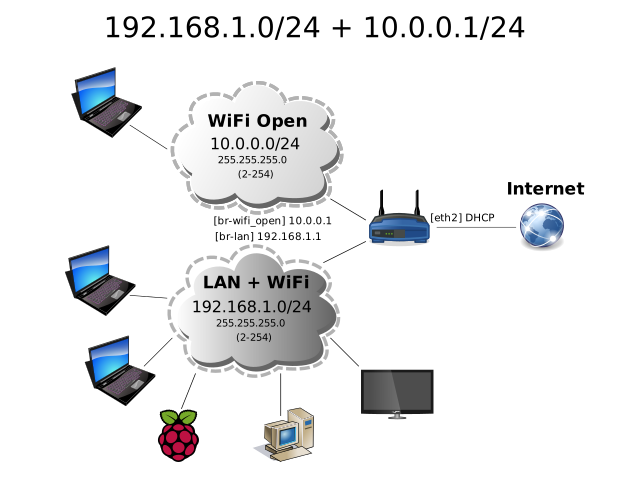
Start with creating the Guest WiFi - OpenWrt Guest WLAN:
1
2
3
4
5
6
7
8
9
10
11
12
13
14
15
16
17
18
19
20
21
22
23
24
25
26
27
28
29
30
31
32
33
34
35
36
37
38
39
40
41
42
43
44
45
46
47
48
49
50
51
52
53
uci set network.wifi_open=interface
uci set network.wifi_open.type=bridge
uci set network.wifi_open.proto=static
uci set network.wifi_open.ipaddr=10.0.0.1
uci set network.wifi_open.netmask=255.255.255.0

uci add wireless wifi-iface
uci set wireless.@wifi-iface[-1].device=radio0
uci set wireless.@wifi-iface[-1].mode=ap
uci set wireless.@wifi-iface[-1].ssid=medlanky.xvx.cz
uci set wireless.@wifi-iface[-1].network=wifi_open
uci set wireless.@wifi-iface[-1].encryption=none
uci set wireless.@wifi-iface[-1].isolate=1

uci set dhcp.wifi_open=dhcp
uci set dhcp.wifi_open.interface=wifi_open
uci set dhcp.wifi_open.start=2
uci set dhcp.wifi_open.limit=253
uci add_list dhcp.wifi_open.dhcp_option=6,10.0.0.1
uci set dhcp.wifi_open.leasetime=1h

uci add firewall zone
uci set firewall.@zone[-1].name=wifi_open
uci add_list firewall.@zone[-1].network=wifi_open
uci set firewall.@zone[-1].input=REJECT
uci set firewall.@zone[-1].forward=REJECT
uci set firewall.@zone[-1].output=ACCEPT

uci add firewall forwarding
uci set firewall.@forwarding[-1].src=wifi_open
uci set firewall.@forwarding[-1].dest=wan

uci add firewall rule
uci set firewall.@rule[-1].name=icmp-echo-request
uci set firewall.@rule[-1].src=wifi_open
uci set firewall.@rule[-1].target=ACCEPT
uci set firewall.@rule[-1].proto=icmp
uci set firewall.@rule[-1].icmp_type=echo-request

uci add firewall rule
uci set firewall.@rule[-1].name=dhcp
uci set firewall.@rule[-1].src=wifi_open
uci set firewall.@rule[-1].target=ACCEPT
uci set firewall.@rule[-1].proto=udp
uci set firewall.@rule[-1].src_port=67-68
uci set firewall.@rule[-1].dest_port=67-68

uci add firewall rule
uci set firewall.@rule[-1].name=dns
uci set firewall.@rule[-1].src=wifi_open
uci set firewall.@rule[-1].target=ACCEPT
uci set firewall.@rule[-1].proto=tcpudp
uci set firewall.@rule[-1].dest_port=53
Next install and configure nodogsplash:
1
2
3
4
5
6
7
8
9
10
11
12
13
14
15
16
17
18
19
20
21
22
23
24
25
26
27
28
29
30
31
32
33
34
35
36
37
38
39
40
41
42
43
44
45
46
47
48
49
50
51
52
53
54
55
#Download the nodosplash compiled for Turris router (mpc85xx) [if it's not already in the "main repository"]
curl -L --insecure "https://github.com/ruzickap/linux.xvx.cz/raw/gh-pages/files/turris_configured/root/nodogsplash_0.9_beta9.9.8-2_mpc85xx.ipk" -O /tmp/nodogsplash_0.9_beta9.9.8-2_mpc85xx.ipk

#Install the package (try first: opkg install nodogsplash)
opkg install /tmp/nodogsplash_0.9_beta9.9.8-2_mpc85xx.ipk

#Backup the original config file
mv /etc/nodogsplash/nodogsplash.conf /etc/nodogsplash/nodogsplash.conf-orig

#Create main config file
cat > /etc/nodogsplash/nodogsplash.conf << EOF
GatewayInterface br-wifi_open

FirewallRuleSet authenticated-users {
    FirewallRule block to 192.168.0.0/16
    FirewallRule block to 10.0.0.0/8
    FirewallRule allow tcp port 53
    FirewallRule allow udp port 53
    FirewallRule allow tcp port 80
    FirewallRule allow tcp port 443
    FirewallRule allow tcp port 22
    FirewallRule allow icmp
}

FirewallRuleSet preauthenticated-users {
    FirewallRule allow tcp port 53
    FirewallRule allow udp port 53
}

FirewallRuleSet users-to-router {
    FirewallRule allow udp port 53
    FirewallRule allow tcp port 53
    FirewallRule allow udp port 67
    FirewallRule allow icmp
}

GatewayName medlanky.xvx.cz
RedirectURL http://medlanky-hotspot.xvx.cz/
ClientForceTimeout 120
EOF

#Enable syslog logging
sed -i 's@^OPTIONS=.*@OPTIONS="-s -d 5"@' /etc/init.d/nodogsplash

#Modify the main page
wget "http://upload.wikimedia.org/wikipedia/commons/thumb/1/1a/Brno-Medl%C3%A1nky_znak.svg/90px-Brno-Medl%C3%A1nky_znak.svg.png" -O /etc/nodogsplash/htdocs/images/90px-Brno-Medlanky_znak.svg.png

cp /etc/nodogsplash/htdocs/splash.html /etc/nodogsplash/htdocs/splash.html-orig

sed -i 's@splash.jpg@90px-Brno-Medlanky_znak.svg.png@;/align="center" height="120">/a\
\ \ \ \ \ \ \ \ <h2>For Internet access - click the sign.</h2> <h2>Pro pristup na Internet klikni na znak.</h2>' /etc/nodogsplash/htdocs/splash.html

#Enable nodogsplash to start at boot as a last service (because of slow guest wifi initialization)
sed -i 's/=65/=99/' /etc/init.d/nodogsplash
/etc/init.d/nodogsplash enable
Here is the video how the Captive portal will looks like:
The full OpenWrt router configs can be found here: https://github.com/ruzickap/linux.xvx.cz/tree/gh-pages/files/turris_configured/etc
Enjoy :-)