IPA (CentOS7) integration with Active Directory (W2K8)
IPA (CentOS7) integration with Active Directory (W2K8)
Original post from linux.xvx.cz
I have been working with IPA in the past few months and I would like to share my notes about the IPA and AD integration.
Network diagram:
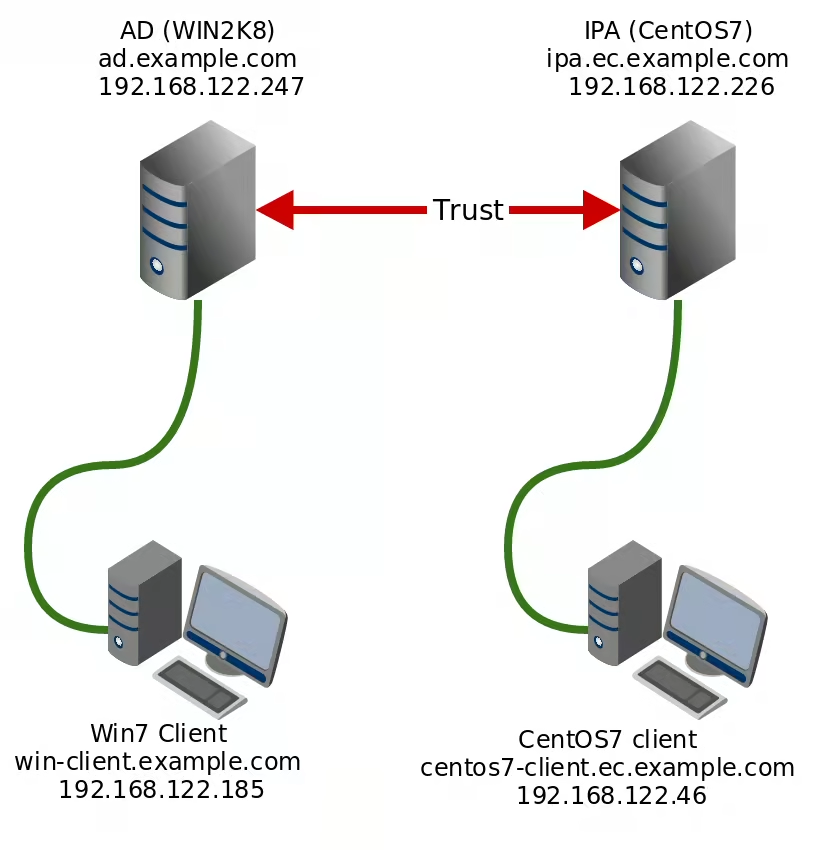
I created the trust between the Active Directory and IPA server. There is one windows client connected to the AD and one CentOS7 client connected to the IPA. Both clients are “registered” into the AD/IPA.
Instead of describing the whole installation - I decided to record a video containing the AD/IPA installation, client registration and Firefox/PuTTY/WinSCP Kerberos/GSSAPI configuration.
The commands used in the video can be found below:
1
2
3
4
5
6
7
8
9
10
11
12
13
14
15
16
17
18
19
20
21
22
23
24
25
26
27
28
29
30
31
32
33
34
35
@echo Change TimeZone
tzutil /s "Central Europe Standard Time"

@echo Configure NTP server
net start w32time
w32tm /config /manualpeerlist:"ntp.cesnet.cz" /reliable:yes /update

@echo Change hostname
powershell -NoProfile -command "$sysInfo = Get-WmiObject -Class Win32_ComputerSystem; $sysInfo.Rename('ad');"

@echo Disable firewall
netsh advfirewall set allprofiles state off

DCPROMO

# "Create a new domain in a new forest"
# example.com
# Windows Server 2008 R2
# admin123
# Reboot on completion

@echo "Ensure the IPA can be reached properly"
dnscmd 127.0.0.1 /RecordAdd example.com ipa.ec A 192.168.122.226
dnscmd 127.0.0.1 /RecordAdd example.com ec NS ipa.ec.example.com
dnscmd 127.0.0.1 /ClearCache

@echo "Create test users"
dsadd user CN=testuser,CN=Users,DC=example,DC=com -samid testuser -pwd Admintest123 -fn Petr -ln Ruzicka -display "Petr Ruzicka" -email petr.ruzicka@example.com -desc "Petr's test user" -pwdneverexpires yes -disabled no
dsadd user CN=testuser2,CN=Users,DC=example,DC=com -samid testuser2 -pwd Admintest123 -fn Petr -ln Ruzicka2 -display "Petr Ruzicka2" -email petr.ruzicka2@example.com -desc "Petr's test user" -pwdneverexpires yes -disabled no

#It's handy to configure Delegation to enable Kerbetos Ticket forwarding for the windows clients:
#https://technet.microsoft.com/en-us/library/ee675779.aspx

#Check trudted domains:
#https://support.microsoft.com/en-us/kb/228477
1
2
3
4
5
6
7
8
9
10
11
12
13
14
15
16
17
18
19
20
21
@echo Change DNS to AD server
netsh interface ipv4 add dnsserver "Local Area Connection" address=192.168.122.247 index=1

@echo Change TimeZone
tzutil /s "Central Europe Standard Time"

@echo Configure NTP server
net start w32time
w32tm /config /manualpeerlist:"ntp.cesnet.cz" /reliable:yes /update

@echo Disable firewall
netsh advfirewall set allprofiles state off

@echo Change hostname
powershell -NoProfile -command "$sysInfo = Get-WmiObject -Class Win32_ComputerSystem; $sysInfo.Rename('win-client');"

@echo Join AD
powershell -Command "$domain = 'example.com'; $password = 'admin123' | ConvertTo-SecureString -asPlainText -Force; $username = \"$domain\Administrator\"; $credential = New-Object System.Management.Automation.PSCredential($username,$password); Add-Computer -DomainName $domain -Credential $credential"

@echo Reboot...
shutdown /r /t 0
1
2
3
4
5
6
7
8
9
10
11
12
13
14
15
16
17
18
19
20
21
22
23
24
25
26
27
28
29
30
31
32
33
34
echo "Turn OFF Firewall"
chkconfig firewalld off
service firewalld stop

echo "192.168.122.226 ipa.ec.example.com ipa" >> /etc/hosts

echo "Change DNS server to 192.168.122.247 (ad.example.com)"
cat >> /etc/dhcp/dhclient-eth0.conf << EOF

supersede domain-name-servers 192.168.122.247;
supersede domain-search "ec.example.com";
EOF
service network restart

echo "Install IPA packages"
yum install -y ipa-server-trust-ad bind bind-dyndb-ldap

echo "Install+Configure IPA"
ipa-server-install --realm=EC.EXAMPLE.COM --domain=ec.example.com --ds-password=admin123 --admin-password=admin123 --mkhomedir --ssh-trust-dns --setup-dns --unattended --forwarder=192.168.122.247 --no-host-dns

echo "Configure IPA server for cross-realm trusts"
ipa-adtrust-install --admin-password=admin123 --netbios-name=EC --add-sids --unattended

echo "Establish and verify cross-realm trust - Add trust with AD domain"
echo -e "admin123\n" | ipa trust-add --type=ad example.com --admin Administrator --password

echo "Check trusted domain"
ipa trustdomain-find example.com

echo "Add new server"
ipa host-add centos7-client.ec.example.com --password=secret --ip-address=192.168.122.46 --os="CentOS 7" --platform="VMware" --location="My lab" --locality="Brno" --desc="Test server"

#Enable kerberos in Firefox
# about:config -> network.negotiate-auth.trusted-uris -> .example.com
1
2
3
4
5
6
7
8
9
10
11
12
13
14
15
16
17
18
19
20
21
22
23
24
25
26
27
# Turn OFF Firewall
chkconfig firewalld off
service firewalld stop

echo "192.168.122.46 centos7-client.ec.example.com centos7-client" >> /etc/hosts

# Change DNS server to 192.168.122.247 (ad.example.com)
cat >> /etc/dhcp/dhclient-eth0.conf << EOF

supersede domain-name-servers 192.168.122.247;
supersede domain-search "ec.example.com";
EOF
service network restart

yum install -y ipa-client

# Register to IPA (there is automatic discovery of IPA IP via DNS)
ipa-client-install -w secret --mkhomedir

#---

# DNS checks
dig SRV _ldap._tcp.example.com
dig SRV _ldap._tcp.ec.example.com

kinit admin
smbclient -L ipa.ec.example.com -k
Most of the commands and it’s description can be found on Google or are obvious. The video has some description, but is’t not very detailed.
Useful links:
- How to Create Active Directory Domain
- https://www.freeipa.org/page/Active_Directory_trust_setup
- https://www.freeipa.org/page/Setting_up_Active_Directory_domain_for_testing_purposes
- https://www.certdepot.net/wp-content/uploads/2015/07/Summit_IdM_Lab_User_Guide_2015.pdf
Enjoy :-)