How to store Google Maps (or any other page) as jpg or png
Save large web pages like Google Maps as JPG or PNG images using KDE window settings and Firefox Abduction addon
https://linux-old.xvx.cz/2009/03/how-to-store-google-maps-or-any-other-page-as-jpg-or-png/
I’m using my old Palm TX to navigate during my travels. I don’t have GPS, but I usually get some maps from the web, store them as jpg and view them on Palm as a picture.
I had problems getting big maps from Google to jpg, because all screen snapshot programs can only get actual “screen” (usually just 1440x900).
My Palm and other devices can handle much bigger images and it’s possible to scroll them. My laptop screen resolution was quite limiting… :-(
I found a solution in KDE:
- Install Firefox add-on called Abduction! It will allow you to save pages or part of the page as image (File -> Save Page As Image…)
- Run Firefox and choose your place in the map.
Press ALT + F3 -> Advanced -> Special Windows Settings…
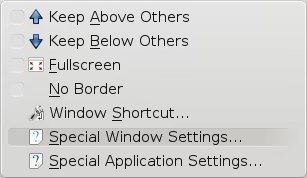 Advanced Windows Settings - KDE
Select Geometry tab and modify “Size” parameters:
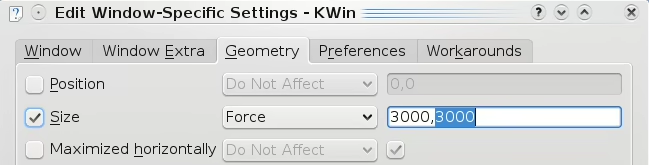 Edit Window Specific Settings Kwin
Then your Firefox should be much bigger (above screen borders) and you should be able to save “one big” page as image…