Debian Wi-Fi hotspot using CoovaChilli, FreeRadius, MySQL and daloRADIUS
Build a Wi-Fi captive portal hotspot on Debian using CoovaChilli, FreeRadius, MySQL, and daloRADIUS
I decided to create a hotspot from my server to allow others to connect to the Internet for free. I used Captive portal solution based on these applications:
When somebody wants to connect to the Internet using my wifi, the first page they see is the register/login page (whatever page they want to visit). After registration/login they are able to connect to the Internet.
So let’s see how I did it.
Let’s have one server with two network interfaces - the first eth0 goes to the Internet, the second one eth1 is the wifi for “unknown” clients.
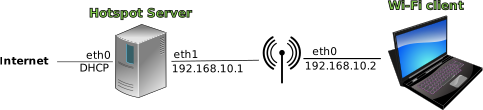
Install basic software:
1
2
3
4
5
6
7
8
9
10
aptitude install mysql-server phpmyadmin freeradius freeradius-utils freeradius-mysql apache2 php-pear php-db
a2enmod ssl
a2ensite default-ssl
service apache2 restart
cd /tmp && wget 'http://downloads.sourceforge.net/project/daloradius/daloradius/daloradius-0.9-8/daloradius-0.9-8.tar.gz'
tar xvzf daloradius-0.9-8.tar.gz
mv /tmp/daloradius-0.9-8 /var/www/daloradius
chown -R www-data:www-data /var/www/daloradius
cp -r /var/www/daloradius/contrib/chilli/portal2/* /var/www/
rm /var/www/index.html
Because my machine is 64-bit I needed to build the CoovaChilli package myself:
1
2
3
4
5
6
aptitude --assume-yes install dpkg-dev debhelper libssl-dev
cd /tmp || exit
wget -c http://ap.coova.org/chilli/coova-chilli-1.2.2.tar.gz
tar xzf coova-chilli*.tar.gz
cd coova-chilli* || exit
dpkg-buildpackage -rfakeroot
Install CoovaChilli:
1
2
cd .. || exit
dpkg -i coova-chilli_*_amd64.deb
Configure FreeRadius
Change /etc/freeradius/clients.conf:
1
2
3
client 127.0.0.1 {
  secret     = mysecret
}
Change /etc/freeradius/sql.conf:
1
2
3
        server = "localhost"
        login = "root"
        password = "xxxx"
Uncomment in /etc/freeradius/sites-available/default:
1
2
3
4
5
6
7
authorize {
          sql
}

accounting {
         sql
}
Uncomment in /etc/freeradius/radiusd.conf:
1
       $INCLUDE sql.conf
Configure MySQL database for FreeRadius
1
2
3
4
5
mysql -u root --password=xxxx
mysql> CREATE DATABASE radius;
mysql> exit

mysql -u root --password=xxxx radius < /var/www/daloradius/contrib/db/fr2-mysql-daloradius-and-freeradius.sql
daloRADIUS configuration
Modify this file /var/www/daloradius/library/daloradius.conf.php
1
2
3
$configValues['CONFIG_DB_PASS'] = 'xxxx';
$configValues['CONFIG_MAINT_TEST_USER_RADIUSSECRET'] = 'mysecret';
$configValues['CONFIG_DB_TBL_RADUSERGROUP'] = 'radusergroup';
You also need to modify following configuration files to setup sign in web pages /var/www/signup-*/library/daloradius.conf.php:
1
2
3
4
5
$configValues['CONFIG_DB_PASS'] = 'xxxx';
$configValues['CONFIG_DB_NAME'] = 'radius';
$configValues['CONFIG_DB_TBL_RADUSERGROUP'] = 'radusergroup';
$configValues['CONFIG_SIGNUP_SUCCESS_MSG_LOGIN_LINK'] = "Click <b>here</b>".
                                        " to return to the Login page and start your surfing";
Change lines in /var/www/signup*/index.php to (changed User-Password -> Cleartext-Password and == -> :=):
1
2
$sql = "INSERT INTO ".$configValues['CONFIG_DB_TBL_RADCHECK']." (id, Username, Attribute, op, Value) ".
                                        " VALUES (0, '$username', 'Cleartext-Password', ':=', '$password')";
Another file that needs to be modified to communicate with CoovaChilli is /var/www/hotspotlogin/hotspotlogin.php
1
$uamsecret = "uamsecret";
Now you should be able to reach daloRADIUS installation on http://127.0.0.1/daloradius/
1
2
username: administrator
password: radius
Routing
We should not forget to enable packet forwarding and setup NAT:
1
2
3
4
iptables -t nat -A POSTROUTING -o eth0 -j MASQUERADE
echo 1 > /proc/sys/net/ipv4/ip_forward
sed --in-place=.old 's/^#\(net.ipv4.ip_forward=1\)/\1/' /etc/sysctl.conf
sysctl -p
CoovaChilli configuration
Let’s start with /etc/chilli/defaults:
1
2
3
4
5
6
7
HS_NETWORK=192.168.10.0
HS_UAMLISTEN=192.168.10.1

HS_RADSECRET=mysecret
HS_UAMSECRET=uamsecret
HS_UAMFORMAT=https://\$HS_UAMLISTEN/hotspotlogin/hotspotlogin.php
HS_UAMHOMEPAGE=https://\$HS_UAMLISTEN
Then don’t forget to enable CoovaChilli to start in /etc/default/chilli:
1
START_CHILLI=1
Maybe you need to execute chilli and radius server with some debug options to see “errors” during client connection:
1
2
chilli --fg --debug
freeradius -X
Few links we created:
http://192.168.10.1/signup-free/- sign up page (if you don’t have username/password)http://192.168.10.1:3990/prelogin- use for login to your portalhttp://192.168.10.1/daloradius/- daloradius admin pagehttp://192.168.10.1/phpmyadmin/- phpmyadmin page (useful for sql database)
This how-to describes a simple configuration of CoovaChilli so there are many things to configure. I didn’t mention anything about security - so it’s up to you to tweak it yourself.
You can find additional info on this web page:
https://help.ubuntu.com/community/WifiDocs/CoovaChilli
Enjoy… ;-)