Amazon EKS with Envoy Gateway deployed using Argo CD
Build Amazon EKS with Envoy Gateway deployed using Argo CD

I will outline the steps for setting up an Amazon EKS environment with Envoy Gateway as the ingress and traffic management layer, deployed and managed by Argo CD using ArgoCD Application CRDs to orchestrate Helm chart installations.
This setup is intended for testing, learning, and development only. For production use, ArgoCD should follow GitOps practices with a Git repository as the source of truth.
The Amazon EKS setup should align with the following criteria:
- Use two Availability Zones (AZs) in a less expensive region (
us-east-1), but schedule workloads in a single AZ to reduce cross-AZ traffic costs - Spot instances using the most price efficient EC2 instance type
t4g.medium(2 x CPU, 4GB RAM) with AWS Graviton based on ARM - Use Bottlerocket OS for a minimal operating system, CPU, and memory footprint
- Leverage Network Load Balancer (NLB) for highly cost-effective and optimized load balancing
- Karpenter to enable automatic node scaling that matches the specific resource requirements of pods
- The Amazon EKS control plane must be encrypted using KMS
- Worker node EBS volumes must be encrypted
- EKS cluster logging to CloudWatch must be configured
- EKS Pod Identities should be used to allow applications and pods to communicate with AWS APIs
- ArgoCD deployed via Helm chart, using Application CRDs for declarative deployments
- Envoy Gateway as the Gateway API implementation with OIDC authentication and JWT-based authorization via Google for protecting web endpoints
- Homepage dashboard for a unified service portal
- VictoriaMetrics for metrics collection and storage, VictoriaLogs for centralized log aggregation, and Grafana for dashboards and visualization
Build Amazon EKS
The following steps will guide you through building a fully functional EKS cluster with all the necessary components deployed via ArgoCD.
Requirements
You will need to configure the AWS CLI and set up other necessary secrets and variables:
1
2
3
4
# AWS Credentials
export AWS_ACCESS_KEY_ID="xxxxxxxxxxxxxxxxxx"
export AWS_SECRET_ACCESS_KEY="xxxxxxxxxxxxxxxxxxxxxxxxxxxxxxxxxxxxxx"
export AWS_SESSION_TOKEN="xxxxxxxx"
If you plan to follow this document and its tasks, you will need to set up a few environment variables, such as:
1
2
3
4
5
6
7
8
9
10
11
12
13
14
15
16
# AWS Region
export AWS_REGION="${AWS_REGION:-us-east-1}"
# Hostname / FQDN definitions
export CLUSTER_FQDN="${CLUSTER_FQDN:-k01.k8s.mylabs.dev}"
# Base Domain: k8s.mylabs.dev
export BASE_DOMAIN="${CLUSTER_FQDN#*.}"
# Cluster Name: k01
export CLUSTER_NAME="${CLUSTER_FQDN%%.*}"
export MY_EMAIL="petr.ruzicka@gmail.com"
export TMP_DIR="${TMP_DIR:-${PWD}/tmp}"
export KUBECONFIG="${KUBECONFIG:-${TMP_DIR}/${CLUSTER_FQDN}/kubeconfig-${CLUSTER_NAME}.conf}"
# Tags used to tag the AWS resources
export TAGS="${TAGS:-Owner=${MY_EMAIL},Environment=dev,Cluster=${CLUSTER_FQDN}}"
export AWS_PARTITION="aws"
AWS_ACCOUNT_ID=$(aws sts get-caller-identity --query "Account" --output text) && export AWS_ACCOUNT_ID
mkdir -pv "${TMP_DIR}/${CLUSTER_FQDN}"
Install the required tools:
You can bypass these procedures if you already have all the essential software installed.
1
mise use aws@2.35.2 eksctl@0.227.0 kubectl@1.36.1 helm@4.2.0 velero@1.18.1
Configure AWS Route 53 Domain delegation
The DNS delegation tasks should be executed as a one-time operation.
 DNS delegation architecture
Create a DNS zone for the EKS clusters:
1
2
3
4
5
6
7
export CLOUDFLARE_EMAIL="petr.ruzicka@gmail.com"
export CLOUDFLARE_API_KEY="1xxxxxxxxx0"

aws route53 create-hosted-zone --output json \
  --name "${BASE_DOMAIN}" \
  --caller-reference "$(date)" \
  --hosted-zone-config="{\"Comment\": \"Created by petr.ruzicka@gmail.com\", \"PrivateZone\": false}" | jq
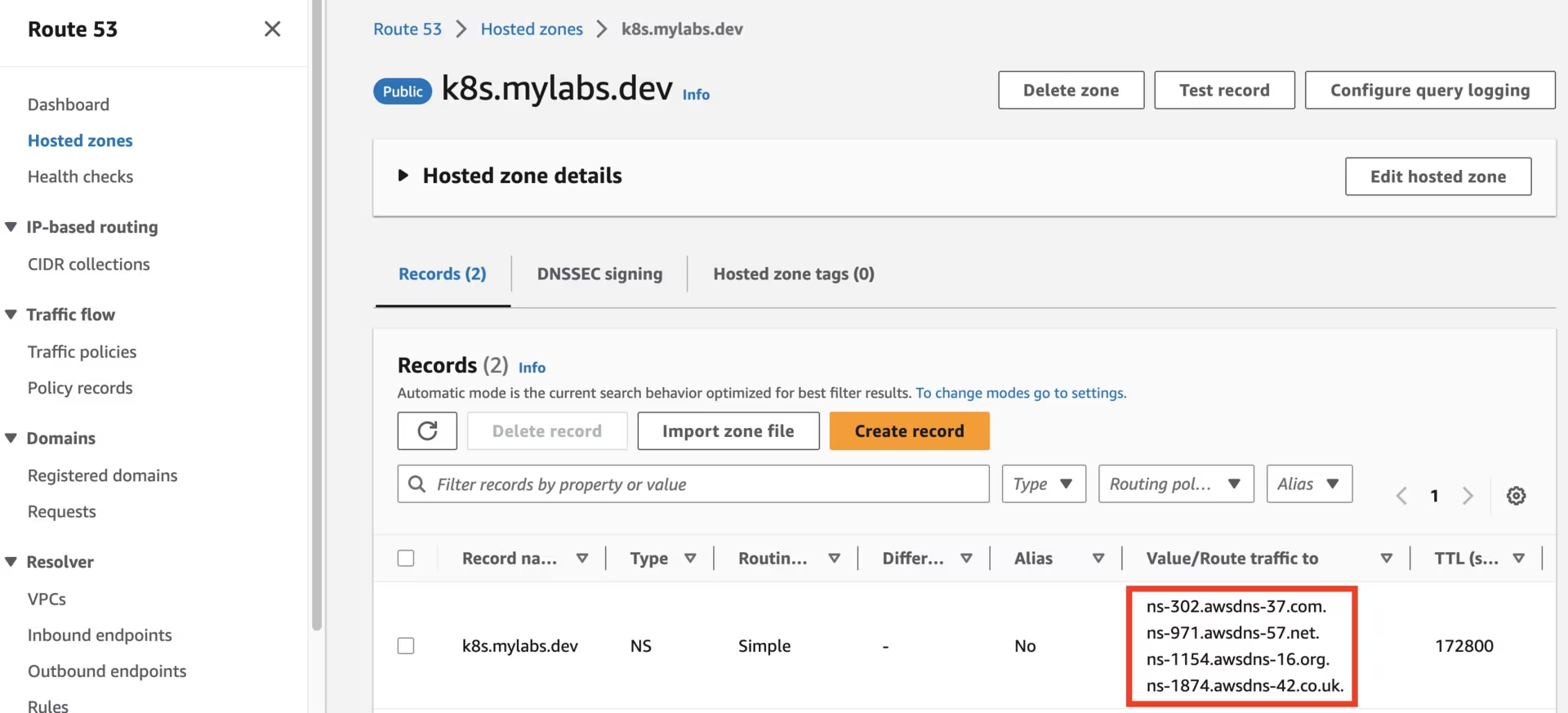 Route53 k8s.mylabs.dev zone
Utilize your domain registrar to update the nameservers for your zone (e.g., mylabs.dev) to point to Amazon Route 53 nameservers. Here’s how to discover the required Route 53 nameservers:
1
2
3
4
NEW_ZONE_ID=$(aws route53 list-hosted-zones --query "HostedZones[?Name==\`${BASE_DOMAIN}.\`].Id" --output text)
NEW_ZONE_NS=$(aws route53 get-hosted-zone --output json --id "${NEW_ZONE_ID}" --query "DelegationSet.NameServers")
NEW_ZONE_NS1=$(echo "${NEW_ZONE_NS}" | jq -r ".[0]")
NEW_ZONE_NS2=$(echo "${NEW_ZONE_NS}" | jq -r ".[1]")
Establish the NS record in k8s.mylabs.dev (your BASE_DOMAIN) for proper zone delegation. This operation’s specifics may vary based on your domain registrar; I use Cloudflare and employ Ansible for automation:
1
2
ansible -m cloudflare_dns -c local -i "localhost," localhost -a "zone=mylabs.dev record=${BASE_DOMAIN} type=NS value=${NEW_ZONE_NS1} solo=true proxied=no account_email=${CLOUDFLARE_EMAIL} account_api_token=${CLOUDFLARE_API_KEY}"
ansible -m cloudflare_dns -c local -i "localhost," localhost -a "zone=mylabs.dev record=${BASE_DOMAIN} type=NS value=${NEW_ZONE_NS2} solo=false proxied=no account_email=${CLOUDFLARE_EMAIL} account_api_token=${CLOUDFLARE_API_KEY}"
1
2
3
4
5
6
7
8
9
10
11
12
13
14
15
16
17
18
19
20
21
22
23
24
25
26
27
28
29
30
31
32
33
34
35
36
37
38
39
40
41
42
43
44
45
46
47
48
49
50
51
52
53
54
55
56
localhost | CHANGED => {
    "ansible_facts": {
        "discovered_interpreter_python": "/usr/bin/python"
    },
    "changed": true,
    "result": {
        "record": {
            "content": "ns-885.awsdns-46.net",
            "created_on": "2020-11-13T06:25:32.18642Z",
            "id": "dxxxxxxxxxxxxxxxxxxxxxxxxxxxxxxb",
            "locked": false,
            "meta": {
                "auto_added": false,
                "managed_by_apps": false,
                "managed_by_argo_tunnel": false,
                "source": "primary"
            },
            "modified_on": "2020-11-13T06:25:32.18642Z",
            "name": "k8s.mylabs.dev",
            "proxiable": false,
            "proxied": false,
            "ttl": 1,
            "type": "NS",
            "zone_id": "2xxxxxxxxxxxxxxxxxxxxxxxxxxxxxxe",
            "zone_name": "mylabs.dev"
        }
    }
}
localhost | CHANGED => {
    "ansible_facts": {
        "discovered_interpreter_python": "/usr/bin/python"
    },
    "changed": true,
    "result": {
        "record": {
            "content": "ns-1692.awsdns-19.co.uk",
            "created_on": "2020-11-13T06:25:37.605605Z",
            "id": "9xxxxxxxxxxxxxxxxxxxxxxxxxxxxxxb",
            "locked": false,
            "meta": {
                "auto_added": false,
                "managed_by_apps": false,
                "managed_by_argo_tunnel": false,
                "source": "primary"
            },
            "modified_on": "2020-11-13T06:25:37.605605Z",
            "name": "k8s.mylabs.dev",
            "proxiable": false,
            "proxied": false,
            "ttl": 1,
            "type": "NS",
            "zone_id": "2xxxxxxxxxxxxxxxxxxxxxxxxxxxxxxe",
            "zone_name": "mylabs.dev"
        }
    }
}
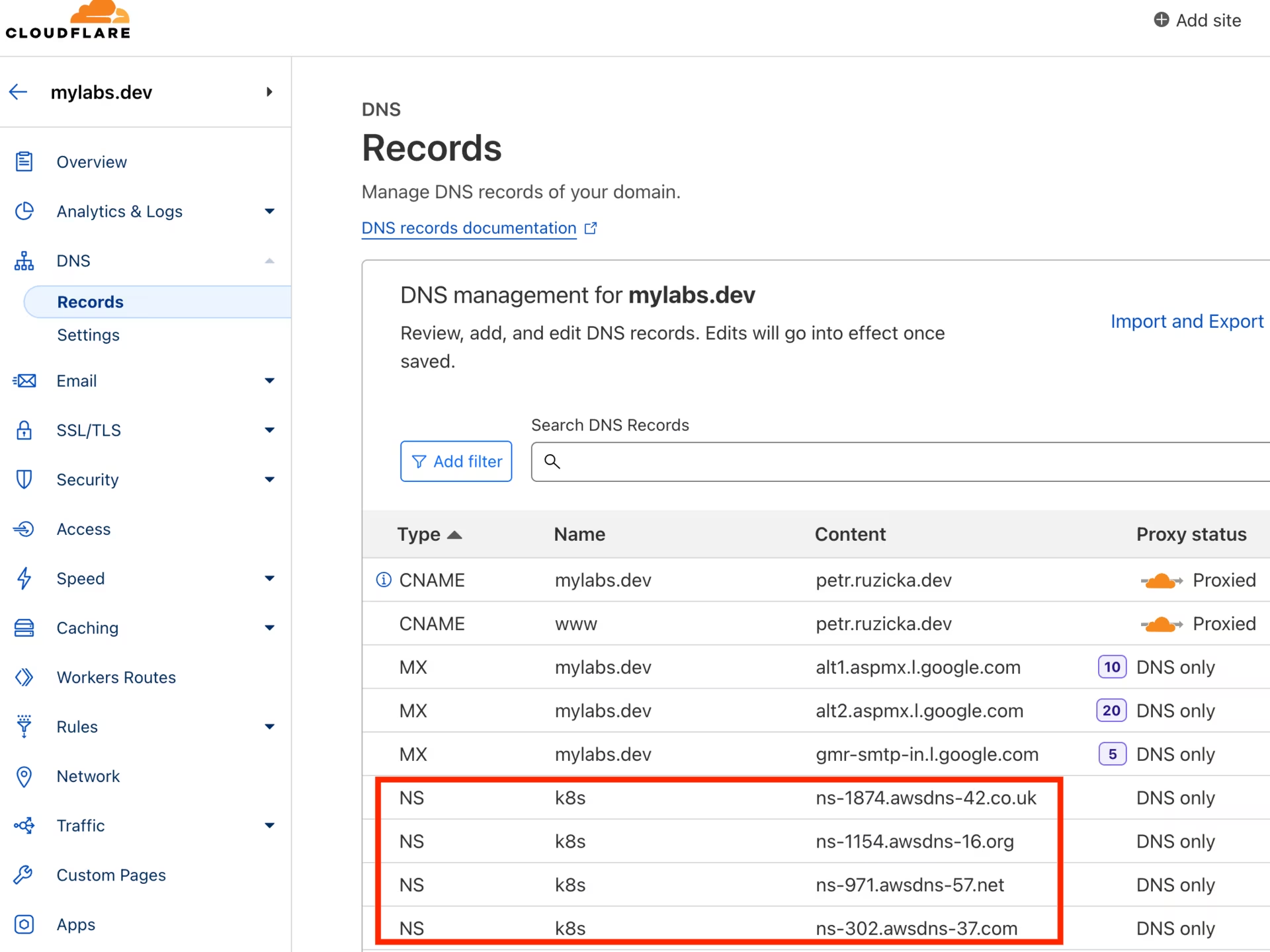 CloudFlare mylabs.dev zone
Create the service-linked role
Creating the service-linked role for Spot Instances is a one-time operation.
Create the AWSServiceRoleForEC2Spot role to use Spot Instances in the Amazon EKS cluster:
1
aws iam create-service-linked-role --aws-service-name spot.amazonaws.com
Details: Work with Spot Instances
Create Route53 and KMS infrastructure
Generate a CloudFormation template that defines an Amazon Route 53 zone and an AWS Key Management Service (KMS) key.
Add the new domain CLUSTER_FQDN to Route 53, and set up DNS delegation from the BASE_DOMAIN.
1
2
3
4
5
6
7
8
9
10
11
12
13
14
15
16
17
18
19
20
21
22
23
24
25
26
27
28
29
30
31
32
33
34
35
36
37
38
39
40
41
42
43
44
45
46
47
48
49
50
51
52
53
54
55
56
57
58
59
60
61
62
63
64
65
66
67
68
69
70
71
72
73
74
75
76
77
78
79
80
81
82
83
84
85
86
87
88
89
90
91
92
93
94
95
96
97
98
99
100
101
102
103
104
105
106
107
108
109
110
111
112
113
114
115
116
117
tee "${TMP_DIR}/${CLUSTER_FQDN}/aws-cf-route53-kms.yml" << \EOF
AWSTemplateFormatVersion: 2010-09-09
Description: Route53 and KMS key

Parameters:
  BaseDomain:
    Description: "Base domain where cluster domains + their subdomains will live - Ex: k8s.mylabs.dev"
    Type: String
  ClusterFQDN:
    Description: "Cluster FQDN (domain for all applications) - Ex: k01.k8s.mylabs.dev"
    Type: String
  ClusterName:
    Description: "Cluster Name - Ex: k01"
    Type: String
Resources:
  HostedZone:
    Type: AWS::Route53::HostedZone
    Properties:
      Name: !Ref ClusterFQDN
  RecordSet:
    Type: AWS::Route53::RecordSet
    Properties:
      HostedZoneName: !Sub "${BaseDomain}."
      Name: !Ref ClusterFQDN
      Type: NS
      TTL: 60
      ResourceRecords: !GetAtt HostedZone.NameServers
  KMSAlias:
    Type: AWS::KMS::Alias
    Properties:
      AliasName: !Sub "alias/eks-${ClusterName}"
      TargetKeyId: !Ref KMSKey
  KMSKey:
    Type: AWS::KMS::Key
    Properties:
      Description: !Sub "KMS key for ${ClusterName} Amazon EKS"
      EnableKeyRotation: true
      PendingWindowInDays: 7
      KeyPolicy:
        Version: "2012-10-17"
        Id: !Sub "eks-key-policy-${ClusterName}"
        Statement:
          - Sid: Allow direct access to key metadata to the account
            Effect: Allow
            Principal:
              AWS:
                - !Sub "arn:${AWS::Partition}:iam::${AWS::AccountId}:root"
            Action:
              - kms:*
            Resource: "*"
          - Sid: Allow access through EBS for all principals in the account that are authorized to use EBS
            Effect: Allow
            Principal:
              AWS: "*"
            Action:
              - kms:Encrypt
              - kms:Decrypt
              - kms:ReEncrypt*
              - kms:GenerateDataKey*
              - kms:CreateGrant
              - kms:DescribeKey
            Resource: "*"
            Condition:
              StringEquals:
                kms:ViaService: !Sub "ec2.${AWS::Region}.amazonaws.com"
                kms:CallerAccount: !Sub "${AWS::AccountId}"
  S3AccessPolicy:
    Type: AWS::IAM::ManagedPolicy
    Properties:
      ManagedPolicyName: !Sub "eksctl-${ClusterName}-s3-access-policy"
      PolicyDocument:
        Version: '2012-10-17'
        Statement:
          - Effect: Allow
            Action:
              - s3:AbortMultipartUpload
              - s3:DeleteObject
              - s3:GetObject
              - s3:ListMultipartUploadParts
              - s3:ListObjects
              - s3:PutObject
              - s3:PutObjectTagging
            Resource: !Sub "arn:aws:s3:::${ClusterFQDN}/*"
          - Effect: Allow
            Action:
              - s3:ListBucket
            Resource: !Sub "arn:aws:s3:::${ClusterFQDN}"
Outputs:
  KMSKeyArn:
    Description: The ARN of the created KMS Key to encrypt EKS related services
    Value: !GetAtt KMSKey.Arn
    Export:
      Name:
        Fn::Sub: "${AWS::StackName}-KMSKeyArn"
  KMSKeyId:
    Description: The ID of the created KMS Key to encrypt EKS related services
    Value: !Ref KMSKey
    Export:
      Name:
        Fn::Sub: "${AWS::StackName}-KMSKeyId"
  S3AccessPolicyArn:
    Description: IAM policy ARN for S3 access by EKS workloads
    Value: !Ref S3AccessPolicy
    Export:
      Name:
        Fn::Sub: "${AWS::StackName}-S3AccessPolicy"
EOF

# shellcheck disable=SC2001
eval aws cloudformation deploy --capabilities CAPABILITY_NAMED_IAM \
  --parameter-overrides "BaseDomain=${BASE_DOMAIN} ClusterFQDN=${CLUSTER_FQDN} ClusterName=${CLUSTER_NAME}" \
  --stack-name "${CLUSTER_NAME}-route53-kms" --template-file "${TMP_DIR}/${CLUSTER_FQDN}/aws-cf-route53-kms.yml" --tags "${TAGS//,/ }"

AWS_CLOUDFORMATION_DETAILS=$(aws cloudformation describe-stacks --stack-name "${CLUSTER_NAME}-route53-kms" --query "Stacks[0].Outputs[? OutputKey==\`KMSKeyArn\` || OutputKey==\`KMSKeyId\` || OutputKey==\`S3AccessPolicyArn\`].{OutputKey:OutputKey,OutputValue:OutputValue}")
AWS_KMS_KEY_ARN=$(echo "${AWS_CLOUDFORMATION_DETAILS}" | jq -r ".[] | select(.OutputKey==\"KMSKeyArn\") .OutputValue")
AWS_KMS_KEY_ID=$(echo "${AWS_CLOUDFORMATION_DETAILS}" | jq -r ".[] | select(.OutputKey==\"KMSKeyId\") .OutputValue")
AWS_S3_ACCESS_POLICY_ARN=$(echo "${AWS_CLOUDFORMATION_DETAILS}" | jq -r ".[] | select(.OutputKey==\"S3AccessPolicyArn\") .OutputValue")
After running the CloudFormation stack, you should see the following Route53 zones:
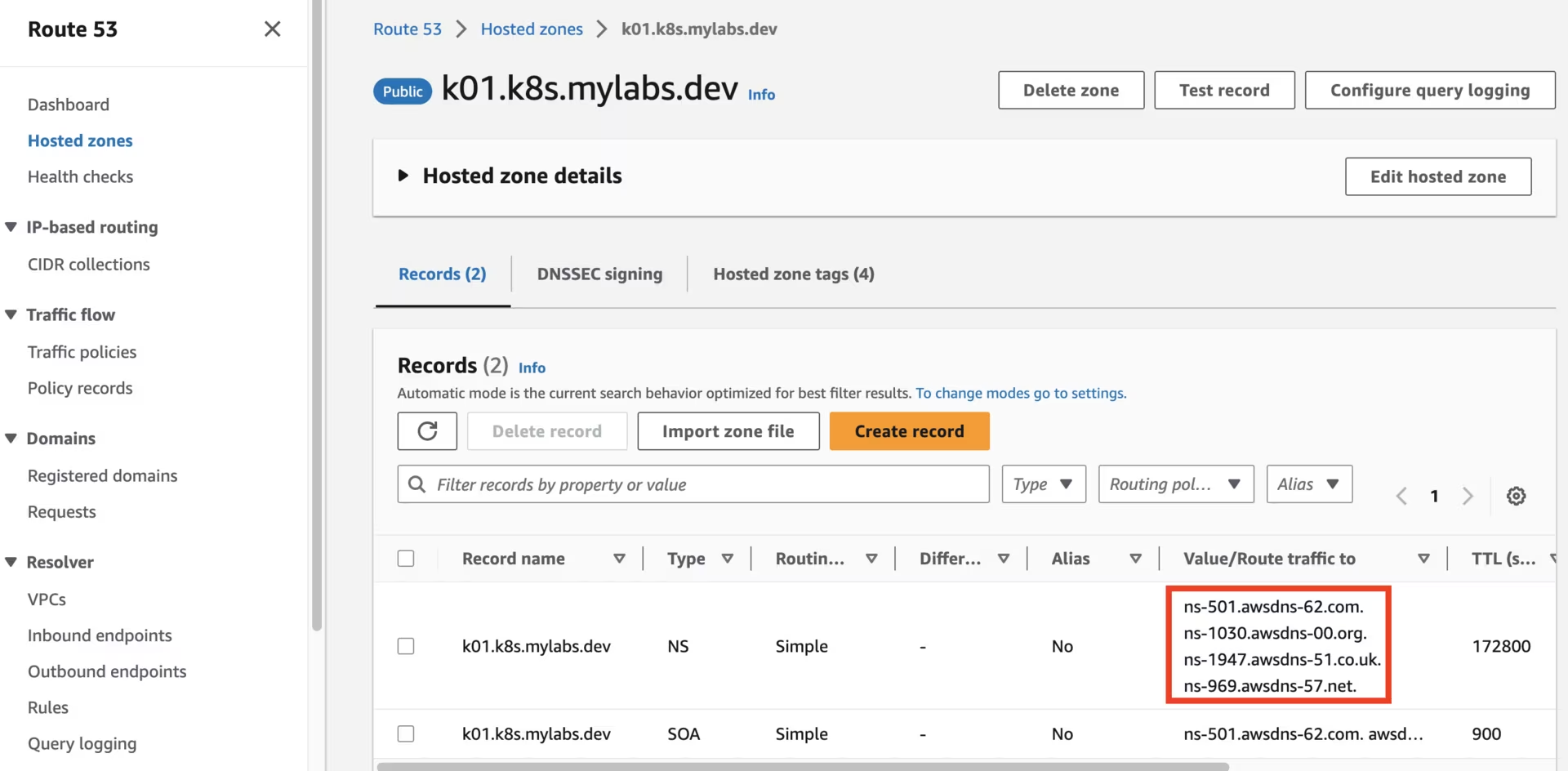 Route53 k01.k8s.mylabs.dev zone
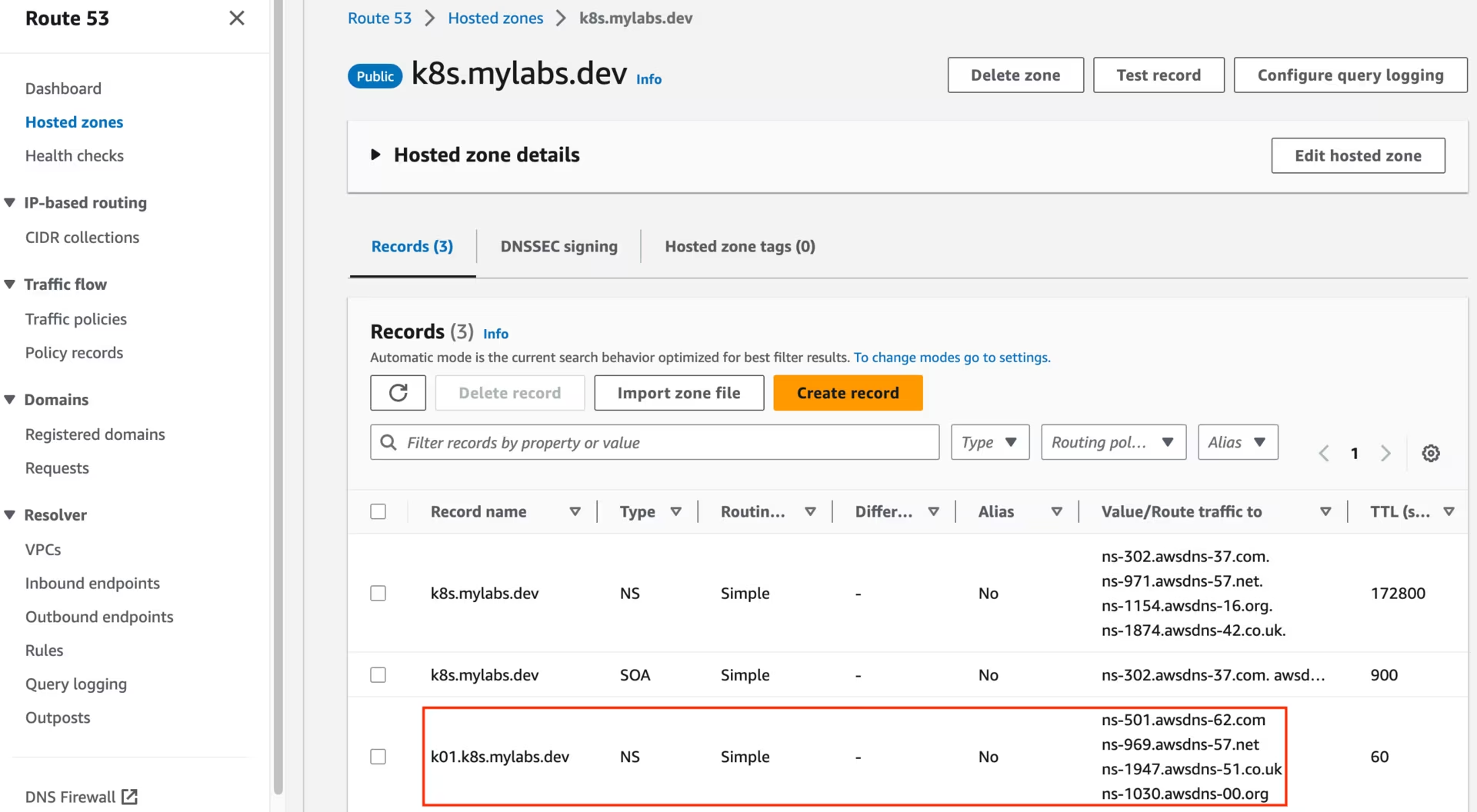 Route53 k8s.mylabs.dev zone
You should also see the following KMS key:
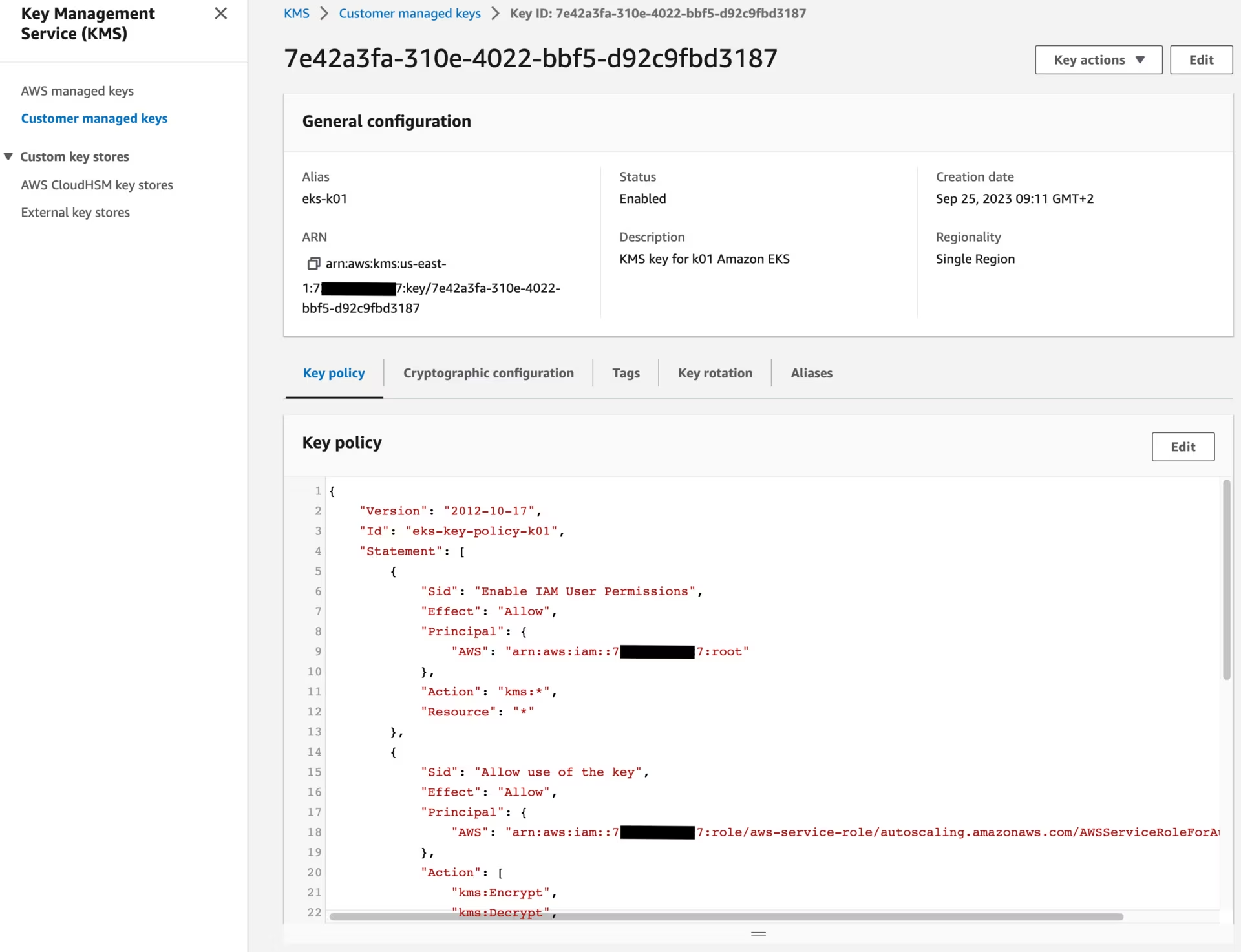 KMS key
Create Karpenter infrastructure
Use CloudFormation to set up the infrastructure needed by the EKS cluster. See CloudFormation for a complete description of what cloudformation.yaml does for Karpenter.

1
2
3
4
5
curl -fsSL https://raw.githubusercontent.com/aws/karpenter-provider-aws/refs/heads/main/website/content/en/v1.13/getting-started/getting-started-with-karpenter/cloudformation.yaml > "${TMP_DIR}/${CLUSTER_FQDN}/cloudformation-karpenter.yml"
eval aws cloudformation deploy --stack-name "${CLUSTER_NAME}-karpenter" \
  --template-file "${TMP_DIR}/${CLUSTER_FQDN}/cloudformation-karpenter.yml" \
  --capabilities CAPABILITY_NAMED_IAM \
  --parameter-overrides "ClusterName=${CLUSTER_NAME}" --tags "${TAGS//,/ }"
Create Amazon EKS
I will use eksctl to create the Amazon EKS cluster.

1
2
3
4
5
6
7
8
9
10
11
12
13
14
15
16
17
18
19
20
21
22
23
24
25
26
27
28
29
30
31
32
33
34
35
36
37
38
39
40
41
42
43
44
45
46
47
48
49
50
51
52
53
54
55
56
57
58
59
60
61
62
63
64
65
66
67
68
69
70
71
72
73
74
75
76
77
78
79
80
81
82
83
84
85
86
87
88
89
90
91
92
93
94
95
96
97
98
99
100
101
102
103
104
105
106
107
108
109
110
111
112
113
114
115
116
117
tee "${TMP_DIR}/${CLUSTER_FQDN}/eksctl-${CLUSTER_NAME}.yml" << EOF
apiVersion: eksctl.io/v1alpha5
kind: ClusterConfig
metadata:
  name: ${CLUSTER_NAME}
  region: ${AWS_REGION}
  tags:
    karpenter.sh/discovery: ${CLUSTER_NAME}
    $(echo "${TAGS}" | sed "s/,/\\n    /g; s/=/: /g")
availabilityZones:
  - ${AWS_REGION}a
  - ${AWS_REGION}b
autoModeConfig:
  enabled: false
accessConfig:
  accessEntries:
    - principalARN: arn:${AWS_PARTITION}:iam::${AWS_ACCOUNT_ID}:role/admin
      accessPolicies:
        - policyARN: arn:${AWS_PARTITION}:eks::aws:cluster-access-policy/AmazonEKSClusterAdminPolicy
          accessScope:
            type: cluster
iam:
  podIdentityAssociations:
    - namespace: aws-load-balancer-controller
      serviceAccountName: aws-load-balancer-controller
      roleName: eksctl-${CLUSTER_NAME}-aws-load-balancer-controller
      wellKnownPolicies:
        awsLoadBalancerController: true
    - namespace: cert-manager
      serviceAccountName: cert-manager
      roleName: eksctl-${CLUSTER_NAME}-cert-manager
      wellKnownPolicies:
        certManager: true
    - namespace: external-dns
      serviceAccountName: external-dns
      roleName: eksctl-${CLUSTER_NAME}-external-dns
      wellKnownPolicies:
        externalDNS: true
    - namespace: karpenter
      serviceAccountName: karpenter
      roleName: eksctl-${CLUSTER_NAME}-karpenter
      permissionPolicyARNs:
        - arn:${AWS_PARTITION}:iam::${AWS_ACCOUNT_ID}:policy/KarpenterControllerNodeLifecyclePolicy-${CLUSTER_NAME}
        - arn:${AWS_PARTITION}:iam::${AWS_ACCOUNT_ID}:policy/KarpenterControllerIAMIntegrationPolicy-${CLUSTER_NAME}
        - arn:${AWS_PARTITION}:iam::${AWS_ACCOUNT_ID}:policy/KarpenterControllerEKSIntegrationPolicy-${CLUSTER_NAME}
        - arn:${AWS_PARTITION}:iam::${AWS_ACCOUNT_ID}:policy/KarpenterControllerInterruptionPolicy-${CLUSTER_NAME}
        - arn:${AWS_PARTITION}:iam::${AWS_ACCOUNT_ID}:policy/KarpenterControllerResourceDiscoveryPolicy-${CLUSTER_NAME}
    - namespace: velero
      serviceAccountName: velero
      roleName: eksctl-${CLUSTER_NAME}-velero
      permissionPolicyARNs:
        - ${AWS_S3_ACCESS_POLICY_ARN}
      permissionPolicy:
        Version: "2012-10-17"
        Statement:
          - Effect: Allow
            Action: [
              "ec2:DescribeVolumes",
              "ec2:DescribeSnapshots",
              "ec2:CreateTags",
              "ec2:CreateSnapshot",
              "ec2:DeleteSnapshot"
            ]
            Resource:
              - "*"
iamIdentityMappings:
  - arn: "arn:${AWS_PARTITION}:iam::${AWS_ACCOUNT_ID}:role/KarpenterNodeRole-${CLUSTER_NAME}"
    username: system:node:
    groups:
      - system:bootstrappers
      - system:nodes
addons:
  - name: eks-pod-identity-agent
  - name: snapshot-controller
  - name: aws-ebs-csi-driver
    useDefaultPodIdentityAssociations: true
    configurationValues: |-
      defaultStorageClass:
        enabled: true
      controller:
        extraVolumeTags:
          $(echo "${TAGS}" | sed "s/,/\\n          /g; s/=/: /g")
        loggingFormat: json
  - name: vpc-cni
    useDefaultPodIdentityAssociations: true
    configurationValues: |-
      enableNetworkPolicy: "true"
      env:
        ENABLE_PREFIX_DELEGATION: "true"
managedNodeGroups:
  - name: mng01-ng
    amiFamily: Bottlerocket
    instanceType: t4g.medium
    desiredCapacity: 2
    availabilityZones:
      - ${AWS_REGION}a
    minSize: 2
    maxSize: 3
    volumeSize: 20
    volumeEncrypted: true
    volumeKmsKeyID: ${AWS_KMS_KEY_ID}
    privateNetworking: true
    nodeRepairConfig:
      enabled: true
    bottlerocket:
      settings:
        kubernetes:
          seccomp-default: true
secretsEncryption:
  keyARN: ${AWS_KMS_KEY_ARN}
cloudWatch:
  clusterLogging:
    logRetentionInDays: 1
    enableTypes:
      - all
EOF
eksctl create cluster --config-file "${TMP_DIR}/${CLUSTER_FQDN}/eksctl-${CLUSTER_NAME}.yml" --kubeconfig "${KUBECONFIG}" || eksctl utils write-kubeconfig --cluster="${CLUSTER_NAME}" --kubeconfig "${KUBECONFIG}"
Retrieve the VPC ID, default security group ID, and NACL ID for the cluster to improve its security posture.
1
2
3
AWS_VPC_ID=$(aws ec2 describe-vpcs --filters "Name=tag:alpha.eksctl.io/cluster-name,Values=${CLUSTER_NAME}" --query 'Vpcs[*].VpcId' --output text)
AWS_SECURITY_GROUP_ID=$(aws ec2 describe-security-groups --filters "Name=vpc-id,Values=${AWS_VPC_ID}" "Name=group-name,Values=default" --query 'SecurityGroups[*].GroupId' --output text)
AWS_NACL_ID=$(aws ec2 describe-network-acls --filters "Name=vpc-id,Values=${AWS_VPC_ID}" --query 'NetworkAcls[*].NetworkAclId' --output text)
Enhance the security posture of the EKS cluster by addressing the following concerns:
The default security group should have no rules configured:
1
2
aws ec2 revoke-security-group-egress --group-id "${AWS_SECURITY_GROUP_ID}" --protocol all --port all --cidr 0.0.0.0/0 | jq || true
aws ec2 revoke-security-group-ingress --group-id "${AWS_SECURITY_GROUP_ID}" --protocol all --port all --source-group "${AWS_SECURITY_GROUP_ID}" | jq || true
The VPC should have Route 53 DNS resolver with logging enabled:
1
2
3
4
5
6
7
8
9
AWS_CLUSTER_LOG_GROUP_ARN=$(aws logs describe-log-groups --query "logGroups[?logGroupName=='/aws/eks/${CLUSTER_NAME}/cluster'].arn" --output text)
AWS_CLUSTER_ROUTE53_RESOLVER_QUERY_LOG_CONFIG_ID=$(aws route53resolver create-resolver-query-log-config \
  --name "${CLUSTER_NAME}-vpc-dns-logs" \
  --destination-arn "${AWS_CLUSTER_LOG_GROUP_ARN}" \
  --creator-request-id "$(cat /proc/sys/kernel/random/uuid)" --query 'ResolverQueryLogConfig.Id' --output text)

aws route53resolver associate-resolver-query-log-config \
  --resolver-query-log-config-id "${AWS_CLUSTER_ROUTE53_RESOLVER_QUERY_LOG_CONFIG_ID}" \
  --resource-id "${AWS_VPC_ID}"
Remove overly permissive NACL rules to follow the principle of least privilege:
1
2
3
4
5
6
7
8
9
10
11
12
13
14
15
16
17
18
19
20
21
22
23
24
25
26
27
28
29
30
31
32
33
# Delete the overly permissive inbound rule
aws ec2 delete-network-acl-entry \
  --network-acl-id "${AWS_NACL_ID}" \
  --rule-number 100 \
  --ingress

# Create restrictive inbound TCP rules
NACL_RULES=(
  "100 443 443 0.0.0.0/0"
  "110 80 80 0.0.0.0/0"
  "120 1024 65535 0.0.0.0/0"
)

for RULE in "${NACL_RULES[@]}"; do
  read -r RULE_NUM PORT_FROM PORT_TO CIDR <<< "${RULE}"
  aws ec2 create-network-acl-entry \
    --network-acl-id "${AWS_NACL_ID}" \
    --rule-number "${RULE_NUM}" \
    --protocol "tcp" \
    --port-range "From=${PORT_FROM},To=${PORT_TO}" \
    --cidr-block "${CIDR}" \
    --rule-action allow \
    --ingress
done

# Allow all traffic from VPC CIDR
aws ec2 create-network-acl-entry \
  --network-acl-id "${AWS_NACL_ID}" \
  --rule-number 130 \
  --protocol "all" \
  --cidr-block "192.168.0.0/16" \
  --rule-action allow \
  --ingress
Pod Scheduling PriorityClasses
Configure PriorityClasses to control the scheduling priority of pods in your cluster. PriorityClasses allow you to influence which pods are scheduled or evicted first when resources are constrained. These classes help ensure that critical workloads receive scheduling priority over less important workloads.
Create custom PriorityClass resources to define priority levels for different workload types:
1
2
3
4
5
6
7
8
9
10
11
12
13
14
15
16
17
tee "${TMP_DIR}/${CLUSTER_FQDN}/k8s-scheduling-priorityclass.yml" << EOF | kubectl apply -f -
apiVersion: scheduling.k8s.io/v1
kind: PriorityClass
metadata:
  name: critical-priority
value: 100001000
globalDefault: false
description: "This priority class should be used for critical workloads only"
---
apiVersion: scheduling.k8s.io/v1
kind: PriorityClass
metadata:
  name: high-priority
value: 100000000
globalDefault: false
description: "This priority class should be used for high priority workloads"
EOF
ArgoCD
Argo CD is a declarative, GitOps continuous delivery tool for Kubernetes. As mentioned earlier, ArgoCD will not use the GitOps approach in this setup, but instead will be installed and managed directly on the cluster using its Helm chart and Application CRDs.

Install the argo-cd Helm chart and modify its default values. The chart is first installed directly via Helm to bootstrap ArgoCD on the cluster. Once Envoy Gateway is deployed and the Gateway resource exists, ArgoCD takes over managing itself through an Application CRD (Manage Argo CD Using Argo CD) that also configures an HTTPRoute referencing the Gateway to expose the ArgoCD UI:
1
2
3
4
5
# renovate: datasource=helm depName=argo-cd registryUrl=https://argoproj.github.io/argo-helm
ARGOCD_HELM_CHART_VERSION="9.5.16"

helm repo add --force-update argo https://argoproj.github.io/argo-helm
helm upgrade --install --version "${ARGOCD_HELM_CHART_VERSION}" --namespace argocd --create-namespace --wait argo-cd argo/argo-cd
Prometheus Operator CRDs
Prometheus Operator CRDs provides the Custom Resource Definitions (CRDs) that define the Prometheus operator resources. These CRDs are required before installing ServiceMonitor resources.
Install the prometheus-operator-crds Helm chart to set up the necessary CRDs:
1
2
3
4
5
6
7
8
9
10
11
12
13
14
15
16
17
18
19
20
21
22
23
24
25
26
27
28
29
30
31
# renovate: datasource=docker depName=prometheus-community/charts/prometheus-operator-crds registryUrl=https://ghcr.io
PROMETHEUS_OPERATOR_CRDS_HELM_CHART_VERSION="29.0.0"

tee "${TMP_DIR}/${CLUSTER_FQDN}/k8s-argocd-prometheus-operator-crds.yml" << EOF | kubectl apply -f -
apiVersion: argoproj.io/v1alpha1
kind: Application
metadata:
  name: prometheus-operator-crds
  namespace: argocd
  finalizers:
    - resources-finalizer.argocd.argoproj.io
spec:
  project: default
  destination:
    namespace: kube-system
    server: https://kubernetes.default.svc
  source:
    chart: prometheus-operator-crds
    repoURL: ghcr.io/prometheus-community/charts
    targetRevision: ${PROMETHEUS_OPERATOR_CRDS_HELM_CHART_VERSION}
  syncPolicy:
    automated:
      prune: true
      selfHeal: true
    syncOptions:
      - CreateNamespace=true
      - ServerSideApply=true
      - Replace=true
EOF
kubectl wait --for='jsonpath={.status.sync.status}=Synced' application/prometheus-operator-crds -n argocd --timeout=300s
kubectl wait --for='jsonpath={.status.health.status}=Healthy' application/prometheus-operator-crds -n argocd --timeout=300s
cert-manager
cert-manager adds certificates and certificate issuers as resource types in Kubernetes clusters and simplifies the process of obtaining, renewing, and using those certificates.
Install the cert-manager Helm chart using an ArgoCD Application CRD:
1
2
3
4
5
6
7
8
9
10
11
12
13
14
15
16
17
18
19
20
21
22
23
24
25
26
27
28
29
30
31
32
33
34
35
36
37
38
39
40
41
42
43
44
45
46
47
48
49
50
51
52
53
54
# renovate: datasource=helm depName=cert-manager registryUrl=https://charts.jetstack.io extractVersion=^(?<version>.+)$
CERT_MANAGER_HELM_CHART_VERSION="v1.19.1"

tee "${TMP_DIR}/${CLUSTER_FQDN}/k8s-argocd-cert-manager.yml" << EOF | kubectl apply -f -
apiVersion: argoproj.io/v1alpha1
kind: Application
metadata:
  name: cert-manager
  namespace: argocd
  finalizers:
    - resources-finalizer.argocd.argoproj.io
spec:
  project: default
  destination:
    namespace: cert-manager
    server: https://kubernetes.default.svc
  source:
    chart: cert-manager
    repoURL: https://charts.jetstack.io
    targetRevision: ${CERT_MANAGER_HELM_CHART_VERSION}
    helm:
      values: |
        global:
          priorityClassName: high-priority
        crds:
          enabled: true
        extraArgs:
          - --enable-certificate-owner-ref=true
        serviceAccount:
          name: cert-manager
        enableCertificateOwnerRef: true
        webhook:
          replicaCount: 2
          affinity:
            podAntiAffinity:
              requiredDuringSchedulingIgnoredDuringExecution:
              - labelSelector:
                  matchLabels:
                    app.kubernetes.io/instance: cert-manager
                    app.kubernetes.io/component: webhook
                topologyKey: kubernetes.io/hostname
        prometheus:
          enabled: true
          servicemonitor:
            enabled: true
  syncPolicy:
    automated:
      prune: true
      selfHeal: true
    syncOptions:
      - CreateNamespace=true
EOF
kubectl wait --for=jsonpath='{.status.sync.status}=Synced' application/cert-manager -n argocd --timeout=300s
kubectl wait --for=jsonpath='{.status.health.status}=Healthy' application/cert-manager -n argocd --timeout=300s
Generate a Let’s Encrypt production certificate
These steps only need to be performed once.
Production-ready Let’s Encrypt certificates should generally be generated only once. The goal is to back up the certificate and then restore it whenever needed for a new cluster.
Create a Let’s Encrypt production ClusterIssuer:
1
2
3
4
5
6
7
8
9
10
11
12
13
14
15
16
17
18
19
20
21
22
23
kubectl wait --namespace cert-manager --for=condition=Available deployment/cert-manager-webhook --timeout=300s
tee "${TMP_DIR}/${CLUSTER_FQDN}/k8s-cert-manager-clusterissuer-production.yml" << EOF | kubectl apply -f -
apiVersion: cert-manager.io/v1
kind: ClusterIssuer
metadata:
  name: letsencrypt-production-dns
  labels:
    letsencrypt: production
spec:
  acme:
    server: https://acme-v02.api.letsencrypt.org/directory
    email: ${MY_EMAIL}
    privateKeySecretRef:
      name: letsencrypt-production-dns
    solvers:
      - selector:
          dnsZones:
            - ${CLUSTER_FQDN}
        dns01:
          route53: {}
EOF
kubectl wait --namespace cert-manager --timeout=15m --for=condition=Ready clusterissuer --all
kubectl label secret --namespace cert-manager letsencrypt-production-dns letsencrypt=production
Create a new certificate and have it signed by Let’s Encrypt for validation:
1
2
3
4
5
6
7
8
9
10
11
12
13
14
15
16
17
18
19
20
21
22
23
24
25
if ! aws s3 ls "s3://${CLUSTER_FQDN}/velero/backups/cert-manager-production/" 2> /dev/null | grep -q .; then
  tee "${TMP_DIR}/${CLUSTER_FQDN}/k8s-cert-manager-certificate-production.yml" << EOF | kubectl apply -f -
  apiVersion: cert-manager.io/v1
  kind: Certificate
  metadata:
    name: cert-production
    namespace: cert-manager
    labels:
      letsencrypt: production
  spec:
    secretName: cert-production
    secretTemplate:
      labels:
        letsencrypt: production
    issuerRef:
      name: letsencrypt-production-dns
      kind: ClusterIssuer
    commonName: "*.${CLUSTER_FQDN}"
    dnsNames:
      - "*.${CLUSTER_FQDN}"
      - "${CLUSTER_FQDN}"
EOF
  kubectl wait --namespace cert-manager --for=condition=Ready --timeout=10m certificate cert-production
  echo "👉 Certificate successfully created and signed by Let's Encrypt."
fi
Create S3 bucket
The following step needs to be performed only once.
Use CloudFormation to create an S3 bucket that will be used for storing Velero backups.
1
2
3
4
5
6
7
8
9
10
11
12
13
14
15
16
17
18
19
20
21
22
23
24
25
26
27
28
29
30
31
32
33
34
35
36
37
38
39
40
41
42
43
44
45
46
47
48
49
50
51
52
53
54
55
56
57
58
59
60
61
62
63
64
65
66
67
68
69
70
71
72
73
74
75
76
77
78
79
80
81
82
83
84
85
86
87
88
89
90
91
92
93
94
95
96
97
98
99
100
101
102
if ! aws s3 ls "s3://${CLUSTER_FQDN}"; then
  cat > "${TMP_DIR}/${CLUSTER_FQDN}/aws-s3.yml" << \EOF
AWSTemplateFormatVersion: 2010-09-09

Parameters:
  S3BucketName:
    Description: Name of the S3 bucket
    Type: String
  EmailToSubscribe:
    Description: Confirm subscription over email to receive a copy of S3 events
    Type: String

Resources:
  S3Bucket:
    Type: AWS::S3::Bucket
    Properties:
      BucketName: !Ref S3BucketName
      PublicAccessBlockConfiguration:
        BlockPublicAcls: true
        BlockPublicPolicy: true
        IgnorePublicAcls: true
        RestrictPublicBuckets: true
      LifecycleConfiguration:
        Rules:
          # Transitions objects to the ONEZONE_IA storage class after 30 days
          - Id: TransitionToOneZoneIA
            Status: Enabled
            Transitions:
              - TransitionInDays: 30
                StorageClass: STANDARD_IA
          - Id: DeleteOldObjects
            Status: Enabled
            ExpirationInDays: 120
      BucketEncryption:
        ServerSideEncryptionConfiguration:
          - ServerSideEncryptionByDefault:
              SSEAlgorithm: aws:kms
              KMSMasterKeyID: alias/aws/s3
  S3BucketPolicy:
    Type: AWS::S3::BucketPolicy
    Properties:
      Bucket: !Ref S3Bucket
      PolicyDocument:
        Version: "2012-10-17"
        Statement:
          # S3 Bucket policy force HTTPs requests
          - Sid: ForceSSLOnlyAccess
            Effect: Deny
            Principal: "*"
            Action: s3:*
            Resource:
              - !GetAtt S3Bucket.Arn
              - !Sub ${S3Bucket.Arn}/*
            Condition:
              Bool:
                aws:SecureTransport: "false"
  S3Policy:
    Type: AWS::IAM::ManagedPolicy
    Properties:
      ManagedPolicyName: !Sub "${S3BucketName}-s3"
      Description: !Sub "Policy required by Velero to write to S3 bucket ${S3BucketName}"
      PolicyDocument:
        Version: "2012-10-17"
        Statement:
        - Effect: Allow
          Action:
          - s3:ListBucket
          - s3:GetBucketLocation
          - s3:ListBucketMultipartUploads
          Resource: !GetAtt S3Bucket.Arn
        - Effect: Allow
          Action:
          - s3:PutObject
          - s3:GetObject
          - s3:DeleteObject
          - s3:ListMultipartUploadParts
          - s3:AbortMultipartUpload
          Resource: !Sub "arn:aws:s3:::${S3BucketName}/*"
        # S3 Bucket policy does not deny HTTP requests
        - Sid: ForceSSLOnlyAccess
          Effect: Deny
          Action: "s3:*"
          Resource:
            - !Sub "arn:${AWS::Partition}:s3:::${S3Bucket}"
            - !Sub "arn:${AWS::Partition}:s3:::${S3Bucket}/*"
          Condition:
            Bool:
              aws:SecureTransport: "false"
Outputs:
  S3PolicyArn:
    Description: The ARN of the created Amazon S3 policy
    Value: !Ref S3Policy
  S3Bucket:
    Description: The name of the created Amazon S3 bucket
    Value: !Ref S3Bucket
EOF

  eval aws cloudformation deploy --capabilities CAPABILITY_NAMED_IAM \
    --parameter-overrides S3BucketName="${CLUSTER_FQDN}" EmailToSubscribe="${MY_EMAIL}" \
    --stack-name "${CLUSTER_NAME}-s3" --template-file "${TMP_DIR}/${CLUSTER_FQDN}/aws-s3.yml" --tags "${TAGS//,/ }"
  echo "👉 S3 bucket successfully created."
fi
Velero
Velero is an open-source tool for backing up and restoring Kubernetes cluster resources and persistent volumes. It enables disaster recovery, data migration, and scheduled backups by integrating with cloud storage providers such as AWS S3.

Install the velero Helm chart using an ArgoCD Application CRD:
1
2
3
4
5
6
7
8
9
10
11
12
13
14
15
16
17
18
19
20
21
22
23
24
25
26
27
28
29
30
31
32
33
34
35
36
37
38
39
40
41
42
43
44
45
46
47
48
49
50
51
52
53
54
55
56
57
58
59
60
# renovate: datasource=helm depName=velero registryUrl=https://vmware-tanzu.github.io/helm-charts
VELERO_HELM_CHART_VERSION="12.0.1"

tee "${TMP_DIR}/${CLUSTER_FQDN}/k8s-argocd-velero.yml" << EOF | kubectl apply -f -
apiVersion: argoproj.io/v1alpha1
kind: Application
metadata:
  name: velero
  namespace: argocd
  finalizers:
    - resources-finalizer.argocd.argoproj.io
spec:
  project: default
  destination:
    namespace: velero
    server: https://kubernetes.default.svc
  source:
    chart: velero
    repoURL: https://vmware-tanzu.github.io/helm-charts
    targetRevision: ${VELERO_HELM_CHART_VERSION}
    helm:
      values: |
        initContainers:
          - name: velero-plugin-for-aws
            # renovate: datasource=github-tags depName=vmware-tanzu/velero-plugin-for-aws extractVersion=^(?<version>.+)$
            image: velero/velero-plugin-for-aws:v1.14.1
            volumeMounts:
              - mountPath: /target
                name: plugins
        priorityClassName: high-priority
        metrics:
          serviceMonitor:
            enabled: true
        configuration:
          backupStorageLocation:
            - name:
              provider: aws
              bucket: ${CLUSTER_FQDN}
              prefix: velero
              config:
                region: ${AWS_REGION}
          volumeSnapshotLocation:
            - name:
              provider: aws
              config:
                region: ${AWS_REGION}
        serviceAccount:
          server:
            name: velero
        credentials:
          useSecret: false
  syncPolicy:
    automated:
      prune: true
      selfHeal: true
    syncOptions:
    - CreateNamespace=true
EOF
kubectl wait --for='jsonpath={.status.sync.status}=Synced' application/velero -n argocd --timeout=300s
kubectl wait --for='jsonpath={.status.health.status}=Healthy' application/velero -n argocd --timeout=300s
Wait for Velero to sync with the S3 bucket and be ready for backup and restore operations:
1
while [ -z "$(kubectl -n velero get backupstoragelocations default -o jsonpath='{.status.lastSyncedTime}')" ]; do sleep 5; done
Initiate the restore process for the cert-manager objects if the backup exists in the S3 bucket:
1
2
3
if aws s3 ls "s3://${CLUSTER_FQDN}/velero/backups/cert-manager-production/" 2> /dev/null | grep -q .; then
  velero restore create restore-cert-manager-production --from-backup cert-manager-production --labels letsencrypt=production --wait --existing-resource-policy=update
fi
AWS Load Balancer Controller
AWS Load Balancer Controller is a Kubernetes controller that provisions AWS Elastic Load Balancers (ALB/NLB) for Kubernetes Services.

Install the aws-load-balancer-controller Helm chart using an ArgoCD Application CRD:
1
2
3
4
5
6
7
8
9
10
11
12
13
14
15
16
17
18
19
20
21
22
23
24
25
26
27
28
29
30
31
32
33
34
35
36
# renovate: datasource=helm depName=aws-load-balancer-controller registryUrl=https://aws.github.io/eks-charts
AWS_LOAD_BALANCER_CONTROLLER_HELM_CHART_VERSION="3.3.0"

tee "${TMP_DIR}/${CLUSTER_FQDN}/k8s-argocd-aws-load-balancer-controller.yml" << EOF | kubectl apply -f -
apiVersion: argoproj.io/v1alpha1
kind: Application
metadata:
  name: aws-load-balancer-controller
  namespace: argocd
  finalizers:
    - resources-finalizer.argocd.argoproj.io
spec:
  project: default
  destination:
    namespace: aws-load-balancer-controller
    server: https://kubernetes.default.svc
  source:
    chart: aws-load-balancer-controller
    repoURL: https://aws.github.io/eks-charts
    targetRevision: ${AWS_LOAD_BALANCER_CONTROLLER_HELM_CHART_VERSION}
    helm:
      values: |
        serviceAccount:
          name: aws-load-balancer-controller
        clusterName: ${CLUSTER_NAME}
        serviceMonitor:
          enabled: true
  syncPolicy:
    automated:
      prune: true
      selfHeal: true
    syncOptions:
      - CreateNamespace=true
EOF
kubectl wait --for='jsonpath={.status.sync.status}=Synced' application/aws-load-balancer-controller -n argocd --timeout=300s
kubectl wait --for='jsonpath={.status.health.status}=Healthy' application/aws-load-balancer-controller -n argocd --timeout=300s
Envoy Gateway
Envoy Gateway is an implementation of the Kubernetes Gateway API built on Envoy Proxy that provides advanced traffic management, OIDC authentication, and JWT-based authorization.

Install Envoy Gateway using an ArgoCD Application CRD.
1
2
3
4
5
6
7
8
9
10
11
12
13
14
15
16
17
18
19
20
21
22
23
24
25
26
27
28
29
30
31
32
33
34
# renovate: datasource=docker depName=envoyproxy/gateway-helm registryUrl=https://docker.io
ENVOY_GATEWAY_HELM_CHART_VERSION="1.8.0"

tee "${TMP_DIR}/${CLUSTER_FQDN}/k8s-argocd-envoy-gateway.yml" << EOF | kubectl apply -f -
apiVersion: argoproj.io/v1alpha1
kind: Application
metadata:
  name: envoy-gateway
  namespace: argocd
  finalizers:
    - resources-finalizer.argocd.argoproj.io
spec:
  project: default
  source:
    chart: gateway-helm
    repoURL: docker.io/envoyproxy
    targetRevision: ${ENVOY_GATEWAY_HELM_CHART_VERSION}
    helm:
      values: |
        deployment:
          priorityClassName: critical-priority
  destination:
    namespace: envoy-gateway-system
    server: https://kubernetes.default.svc
  syncPolicy:
    syncOptions:
      - CreateNamespace=true
      - ServerSideApply=true
    automated:
      prune: true
      selfHeal: true
EOF
kubectl wait --for='jsonpath={.status.sync.status}=Synced' application/envoy-gateway -n argocd --timeout=300s
kubectl wait --for='jsonpath={.status.health.status}=Healthy' application/envoy-gateway -n argocd --timeout=300s
The Helm chart does not include the GatewayClass resource — it must be created separately. Following the official guide, apply the GatewayClass explicitly alongside the EnvoyProxy, Gateway, and SecurityPolicy resources. The SecurityPolicy handles the full OIDC authorization code flow with Google - redirect, consent, callback, and cookie-based session management - plus JWT-based authorization to restrict access to a specific email address.
1
2
3
4
5
6
7
8
9
10
11
12
13
14
15
16
17
18
19
20
21
22
23
24
25
26
27
28
29
30
31
32
33
34
35
36
37
38
39
40
41
42
43
44
45
46
47
48
49
50
51
52
53
54
55
56
57
58
59
60
61
62
63
64
65
66
67
68
69
70
71
72
73
74
75
76
77
78
79
80
81
82
83
84
85
86
87
88
89
90
91
92
93
94
95
96
97
98
99
100
101
102
103
104
105
106
107
108
109
110
111
112
113
114
115
116
117
118
119
120
121
122
123
124
125
126
127
128
129
130
131
132
133
134
135
136
137
138
139
140
141
142
tee "${TMP_DIR}/${CLUSTER_FQDN}/k8s-envoy-gateway-gateway.yml" << EOF | kubectl apply -f -
apiVersion: gateway.networking.k8s.io/v1
kind: GatewayClass
metadata:
  name: eg
spec:
  controllerName: gateway.envoyproxy.io/gatewayclass-controller
---
apiVersion: gateway.envoyproxy.io/v1alpha1
kind: EnvoyProxy
metadata:
  name: aws-nlb
  namespace: envoy-gateway-system
spec:
  provider:
    type: Kubernetes
    kubernetes:
      envoyService:
        annotations:
          service.beta.kubernetes.io/aws-load-balancer-type: external
          service.beta.kubernetes.io/aws-load-balancer-scheme: internet-facing
          service.beta.kubernetes.io/aws-load-balancer-nlb-target-type: ip
          service.beta.kubernetes.io/aws-load-balancer-name: eks-${CLUSTER_NAME}
          service.beta.kubernetes.io/aws-load-balancer-additional-resource-tags: ${TAGS//\'/}
---
apiVersion: gateway.networking.k8s.io/v1beta1
kind: ReferenceGrant
metadata:
  name: allow-eg-to-cert-manager-secrets
  namespace: cert-manager
spec:
  from:
    - group: gateway.networking.k8s.io
      kind: Gateway
      namespace: envoy-gateway-system
  to:
    - group: ""
      kind: Secret
      name: cert-production
---
apiVersion: gateway.networking.k8s.io/v1
kind: Gateway
metadata:
  name: eg
  namespace: envoy-gateway-system
  annotations:
    cert-manager.io/cluster-issuer: letsencrypt-production-dns
spec:
  gatewayClassName: eg
  infrastructure:
    parametersRef:
      group: gateway.envoyproxy.io
      kind: EnvoyProxy
      name: aws-nlb
  listeners:
    - name: https
      port: 443
      protocol: HTTPS
      hostname: "*.${CLUSTER_FQDN}"
      tls:
        mode: Terminate
        certificateRefs:
          - name: cert-production
            namespace: cert-manager
      allowedRoutes:
        namespaces:
          from: All
    - name: https-apex
      port: 443
      protocol: HTTPS
      hostname: "${CLUSTER_FQDN}"
      tls:
        mode: Terminate
        certificateRefs:
          - name: cert-production
            namespace: cert-manager
      allowedRoutes:
        namespaces:
          from: All
---
apiVersion: v1
kind: Secret
metadata:
  name: google-oidc-client-secret
  namespace: envoy-gateway-system
type: Opaque
stringData:
  client-secret: "${GOOGLE_CLIENT_SECRET}"
---
apiVersion: gateway.envoyproxy.io/v1alpha1
kind: SecurityPolicy
metadata:
  name: google-oidc
  namespace: envoy-gateway-system
spec:
  targetRefs:
    - group: gateway.networking.k8s.io
      kind: Gateway
      name: eg
  oidc:
    provider:
      issuer: "https://accounts.google.com"
    clientID: "${GOOGLE_CLIENT_ID}"
    clientSecret:
      name: google-oidc-client-secret
    redirectURL: "https://${CLUSTER_FQDN}/oauth2/callback"
    scopes:
      - openid
      - email
      - profile
    cookieNames:
      accessToken: oidc-access-token
      idToken: oidc-id-token
    cookieDomain: "${CLUSTER_FQDN}"
    logoutPath: "/logout"
  jwt:
    providers:
      - name: google
        issuer: "https://accounts.google.com"
        remoteJWKS:
          uri: "https://www.googleapis.com/oauth2/v3/certs"
        extractFrom:
          cookies:
            - oidc-id-token
        claimToHeaders:
          - header: X-Forwarded-Email
            claim: email
          - header: X-Forwarded-User
            claim: name
  authorization:
    defaultAction: Deny
    rules:
      - name: allow-specific-email
        action: Allow
        principal:
          jwt:
            provider: google
            claims:
              - name: email
                values:
                  - "${MY_EMAIL}"
EOF
All routes through the Envoy Gateway now require Google authentication. Only ${MY_EMAIL} is allowed to access the services.
Create an ArgoCD Application to let ArgoCD manage itself. The server.httproute section configures an HTTPRoute to expose the ArgoCD UI via the Envoy Gateway:
1
2
3
4
5
6
7
8
9
10
11
12
13
14
15
16
17
18
19
20
21
22
23
24
25
26
27
28
29
30
31
32
33
34
35
36
37
38
39
40
41
42
43
44
45
46
47
48
49
50
51
52
53
54
55
56
57
58
59
60
61
62
63
64
65
66
67
68
69
70
71
72
73
74
75
76
77
78
79
80
81
82
83
84
tee "${TMP_DIR}/${CLUSTER_FQDN}/k8s-argocd-argo-cd.yml" << EOF | kubectl apply -f -
apiVersion: argoproj.io/v1alpha1
kind: Application
metadata:
  name: argo-cd
  namespace: argocd
  finalizers:
    - resources-finalizer.argocd.argoproj.io
spec:
  project: default
  destination:
    namespace: argocd
    server: https://kubernetes.default.svc
  source:
    chart: argo-cd
    repoURL: https://argoproj.github.io/argo-helm
    targetRevision: ${ARGOCD_HELM_CHART_VERSION}
    helm:
      values: |
        global:
          priorityClassName: critical-priority
          domain: argocd.${CLUSTER_FQDN}
        configs:
          params:
            server.insecure: true
            server.disable.auth: true
          rbac:
            policy.csv: |
              g, ${MY_EMAIL}, role:admin
              g, readonly, role:readonly
          cm:
            admin.enabled: "false"
            accounts.admin: ""
            accounts.readonly: apiKey
            url: https://argocd.${CLUSTER_FQDN}
            auth.proxy.enabled: "true"
            auth.proxy.header.email: X-Forwarded-Email
            auth.proxy.header.name: X-Forwarded-User
        controller:
          metrics:
            enabled: true
            serviceMonitor:
              enabled: true
        server:
          httproute:
            enabled: true
            parentRefs:
              - name: eg
                namespace: envoy-gateway-system
                group: gateway.networking.k8s.io
                kind: Gateway
                sectionName: https
            hostnames:
              - argocd.${CLUSTER_FQDN}
            annotations:
              gethomepage.dev/enabled: "true"
              gethomepage.dev/name: ArgoCD
              gethomepage.dev/description: GitOps Continuous Delivery
              gethomepage.dev/group: Cluster Management
              gethomepage.dev/icon: https://raw.githubusercontent.com/homarr-labs/dashboard-icons/38631ad11695467d7a9e432d5fdec7a39a31e75f/svg/argo-cd.svg
              gethomepage.dev/href: https://argocd.${CLUSTER_FQDN}
              gethomepage.dev/pod-selector: app.kubernetes.io/name=argocd-server
              gethomepage.dev/widget.type: argocd
              gethomepage.dev/widget.url: http://argo-cd-argocd-server.argocd.svc:80
              gethomepage.dev/widget.fields: '["apps","synced","outOfSync","healthy"]'
          metrics:
            enabled: true
            serviceMonitor:
              enabled: true
        repoServer:
          metrics:
            enabled: true
            serviceMonitor:
              enabled: true
  syncPolicy:
    automated:
      prune: true
      selfHeal: true
    syncOptions:
      - CreateNamespace=true
      - ServerSideApply=true
EOF
kubectl wait --for='jsonpath={.status.sync.status}=Synced' application/argo-cd -n argocd --timeout=300s
kubectl wait --for='jsonpath={.status.health.status}=Healthy' application/argo-cd -n argocd --timeout=300s
Remove the initial Helm release secret so that only ArgoCD manages itself going forward (the bootstrap release is no longer needed):
1
kubectl delete secret -n argocd -l owner=helm,name=argo-cd
Generate an API token for the readonly account and annotate the ArgoCD HTTPRoute so the Homepage ArgoCD widget can query application status:
1
2
3
4
5
6
ARGOCD_SERVER_POD=$(kubectl get pod -n argocd -l app.kubernetes.io/name=argocd-server -o jsonpath='{.items[0].metadata.name}')
set +x
ARGOCD_TOKEN=$(kubectl exec -n argocd "${ARGOCD_SERVER_POD}" -- argocd account generate-token --account readonly --server localhost:8080 --plaintext)
echo "::add-mask::${ARGOCD_TOKEN}"
kubectl annotate httproute -n argocd argo-cd-argocd-server gethomepage.dev/widget.key="${ARGOCD_TOKEN}" --overwrite
set -x
Add Storage Classes and Volume Snapshots
Configure persistent storage for your EKS cluster by setting up gp3 storage classes and volume snapshot capabilities. This ensures encrypted, expandable storage with proper backup functionality.
1
2
3
4
5
6
7
8
9
10
11
12
13
14
15
16
17
18
19
20
21
22
23
24
25
tee "${TMP_DIR}/${CLUSTER_FQDN}/k8s-storage-snapshot-storageclass-volumesnapshotclass.yml" << EOF | kubectl apply -f -
apiVersion: storage.k8s.io/v1
kind: StorageClass
metadata:
  name: gp3
  annotations:
    storageclass.kubernetes.io/is-default-class: "true"
provisioner: ebs.csi.aws.com
parameters:
  type: gp3
  encrypted: "true"
  kmsKeyId: ${AWS_KMS_KEY_ARN}
reclaimPolicy: Delete
allowVolumeExpansion: true
volumeBindingMode: WaitForFirstConsumer
---
apiVersion: snapshot.storage.k8s.io/v1
kind: VolumeSnapshotClass
metadata:
  name: ebs-vsc
  annotations:
    snapshot.storage.kubernetes.io/is-default-class: "true"
driver: ebs.csi.aws.com
deletionPolicy: Delete
EOF
Delete the gp2 StorageClass, as gp3 will be used instead:
1
kubectl delete storageclass gp2 || true
Karpenter
Karpenter is a Kubernetes node autoscaler built for flexibility, performance, and simplicity.

Install the karpenter Helm chart using an ArgoCD Application CRD:
1
2
3
4
5
6
7
8
9
10
11
12
13
14
15
16
17
18
19
20
21
22
23
24
25
26
27
28
29
30
31
32
33
34
35
36
37
38
39
# renovate: datasource=github-tags depName=aws/karpenter-provider-aws
KARPENTER_HELM_CHART_VERSION="1.12.1"

tee "${TMP_DIR}/${CLUSTER_FQDN}/k8s-argocd-karpenter.yml" << EOF | kubectl apply -f -
apiVersion: argoproj.io/v1alpha1
kind: Application
metadata:
  name: karpenter
  namespace: argocd
  finalizers:
    - resources-finalizer.argocd.argoproj.io
spec:
  project: default
  destination:
    namespace: karpenter
    server: https://kubernetes.default.svc
  source:
    chart: karpenter
    repoURL: public.ecr.aws/karpenter
    targetRevision: ${KARPENTER_HELM_CHART_VERSION}
    helm:
      values: |
        settings:
          clusterName: ${CLUSTER_NAME}
          eksControlPlane: true
          interruptionQueue: ${CLUSTER_NAME}
          featureGates:
            spotToSpotConsolidation: true
        serviceMonitor:
          enabled: true
  syncPolicy:
    automated:
      prune: true
      selfHeal: true
    syncOptions:
      - CreateNamespace=true
EOF
kubectl wait --for='jsonpath={.status.sync.status}=Synced' application/karpenter -n argocd --timeout=300s
kubectl wait --for='jsonpath={.status.health.status}=Healthy' application/karpenter -n argocd --timeout=300s
Configure Karpenter by applying the following provisioner definition:
1
2
3
4
5
6
7
8
9
10
11
12
13
14
15
16
17
18
19
20
21
22
23
24
25
26
27
28
29
30
31
32
33
34
35
36
37
38
39
40
41
42
43
44
45
46
47
48
49
50
51
52
53
54
55
56
57
58
59
60
61
62
63
tee "${TMP_DIR}/${CLUSTER_FQDN}/k8s-karpenter-nodepool.yml" << EOF | kubectl apply -f -
apiVersion: karpenter.k8s.aws/v1
kind: EC2NodeClass
metadata:
  name: default
spec:
  amiFamily: Bottlerocket
  amiSelectorTerms:
    - alias: bottlerocket@latest
  subnetSelectorTerms:
    - tags:
        karpenter.sh/discovery: "${CLUSTER_NAME}"
  securityGroupSelectorTerms:
    - tags:
        karpenter.sh/discovery: "${CLUSTER_NAME}"
  role: "KarpenterNodeRole-${CLUSTER_NAME}"
  tags:
    Name: "${CLUSTER_NAME}-karpenter"
    $(echo "${TAGS}" | sed "s/,/\\n    /g; s/=/: /g")
  blockDeviceMappings:
    - deviceName: /dev/xvda
      ebs:
        volumeSize: 2Gi
        volumeType: gp3
        encrypted: true
        kmsKeyID: ${AWS_KMS_KEY_ARN}
    - deviceName: /dev/xvdb
      ebs:
        volumeSize: 20Gi
        volumeType: gp3
        encrypted: true
        kmsKeyID: ${AWS_KMS_KEY_ARN}
---
apiVersion: karpenter.sh/v1
kind: NodePool
metadata:
  name: default
spec:
  template:
    spec:
      requirements:
        # keep-sorted start
        - key: "karpenter.k8s.aws/instance-memory"
          operator: Gt
          values: ["4095"]
        - key: "topology.kubernetes.io/zone"
          operator: In
          values: ["${AWS_REGION}a"]
        - key: karpenter.k8s.aws/instance-family
          operator: In
          values: ["t4g", "t3a"]
        - key: karpenter.sh/capacity-type
          operator: In
          values: ["spot", "on-demand"]
        - key: kubernetes.io/arch
          operator: In
          values: ["arm64", "amd64"]
        # keep-sorted end
      nodeClassRef:
        group: karpenter.k8s.aws
        kind: EC2NodeClass
        name: default
EOF
ExternalDNS
ExternalDNS synchronizes exposed Kubernetes Services and Ingresses with DNS providers.
ExternalDNS will manage the DNS records. Install the external-dns Helm chart using an ArgoCD Application CRD:
1
2
3
4
5
6
7
8
9
10
11
12
13
14
15
16
17
18
19
20
21
22
23
24
25
26
27
28
29
30
31
32
33
34
35
36
37
38
39
40
41
42
43
# renovate: datasource=helm depName=external-dns registryUrl=https://kubernetes-sigs.github.io/external-dns/
EXTERNAL_DNS_HELM_CHART_VERSION="1.21.1"

tee "${TMP_DIR}/${CLUSTER_FQDN}/k8s-argocd-external-dns.yml" << EOF | kubectl apply -f -
apiVersion: argoproj.io/v1alpha1
kind: Application
metadata:
  name: external-dns
  namespace: argocd
  finalizers:
    - resources-finalizer.argocd.argoproj.io
spec:
  project: default
  destination:
    namespace: external-dns
    server: https://kubernetes.default.svc
  source:
    chart: external-dns
    repoURL: https://kubernetes-sigs.github.io/external-dns/
    targetRevision: ${EXTERNAL_DNS_HELM_CHART_VERSION}
    helm:
      values: |
        serviceAccount:
          name: external-dns
        priorityClassName: high-priority
        interval: 20s
        policy: sync
        domainFilters:
          - ${CLUSTER_FQDN}
        sources:
          - service
          - ingress
          - gateway-httproute
          - gateway-grpcroute
        serviceMonitor:
          enabled: true
  syncPolicy:
    automated:
      prune: true
      selfHeal: true
    syncOptions:
      - CreateNamespace=true
EOF
victoria-metrics-k8s-stack

Install victoria-metrics-k8s-stack which provides a full monitoring stack with VictoriaMetrics components: VMSingle for metrics storage, VMAgent for scraping, VMAlert for alerting rules, the VictoriaMetrics Operator with CRDs (VMServiceScrape, VMPodScrape, VMRule, etc.), and Grafana with preconfigured VictoriaMetrics and VictoriaLogs datasources. The victoriametrics-metrics-datasource and victoriametrics-logs-datasource Grafana plugins are required for the native VictoriaMetrics and VictoriaLogs datasource types:
1
2
3
4
5
6
7
8
9
10
11
12
13
14
15
16
17
18
19
20
21
22
23
24
25
26
27
28
29
30
31
32
33
34
35
36
37
38
39
40
41
42
43
44
45
46
47
48
49
50
51
52
53
54
55
56
57
58
59
60
61
62
63
64
65
66
67
68
69
70
71
72
73
74
75
76
77
78
79
80
81
82
83
84
85
86
87
88
89
90
91
92
93
94
95
96
97
98
99
100
101
102
103
104
105
106
107
108
109
110
111
112
113
114
115
116
117
118
119
120
121
122
123
124
125
126
127
128
129
130
131
132
133
134
135
136
137
138
139
140
141
142
143
144
145
146
147
148
149
150
151
152
153
154
155
156
157
158
159
160
161
162
163
164
165
166
167
168
169
170
171
172
173
174
175
176
177
178
179
180
181
182
183
184
185
186
187
188
189
190
191
192
193
194
195
196
197
198
199
200
201
202
203
204
205
206
207
208
209
210
211
212
213
214
215
216
217
218
219
220
221
222
223
224
225
226
227
228
229
230
231
232
233
234
235
236
237
238
239
240
241
242
243
244
245
246
247
248
249
250
251
252
253
254
255
256
257
258
259
260
261
262
263
264
265
266
267
268
269
270
271
272
273
274
275
276
277
278
279
280
281
282
283
284
285
286
287
# renovate: datasource=helm depName=victoria-metrics-k8s-stack registryUrl=https://victoriametrics.github.io/helm-charts
VICTORIA_METRICS_K8S_STACK_HELM_CHART_VERSION="0.81.0"
set +x
GRAFANA_ADMIN_PASSWORD=$(openssl rand -base64 24)
echo "::add-mask::${GRAFANA_ADMIN_PASSWORD}"
set -x

tee "${TMP_DIR}/${CLUSTER_FQDN}/k8s-argocd-victoria-metrics-k8s-stack.yml" << EOF | kubectl apply -f -
apiVersion: argoproj.io/v1alpha1
kind: Application
metadata:
  name: victoria-metrics-k8s-stack
  namespace: argocd
  finalizers:
    - resources-finalizer.argocd.argoproj.io
spec:
  project: default
  destination:
    namespace: monitoring
    server: https://kubernetes.default.svc
  source:
    chart: victoria-metrics-k8s-stack
    repoURL: https://victoriametrics.github.io/helm-charts
    targetRevision: ${VICTORIA_METRICS_K8S_STACK_HELM_CHART_VERSION}
    helm:
      values: |
        argocdReleaseOverride: victoria-metrics-k8s-stack
        vmsingle:
          enabled: true
          spec:
            retentionPeriod: "2"
            replicaCount: 1
            storage:
              accessModes:
                - ReadWriteOnce
              resources:
                requests:
                  storage: 10Gi
            extraArgs:
              search.maxStalenessInterval: 5m
        vmcluster:
          enabled: false
        vmagent:
          enabled: true
          spec:
            scrapeInterval: 30s
            selectAllByDefault: true
            externalLabels:
              cluster: ${CLUSTER_NAME}
            extraArgs:
              promscrape.streamParse: "true"
        vmalert:
          enabled: true
          spec:
            evaluationInterval: 30s
            selectAllByDefault: true
        alertmanager:
          enabled: true
          spec:
            replicaCount: 1
          config:
            route:
              receiver: blackhole
              group_by:
                - alertgroup
                - job
              group_wait: 30s
              group_interval: 5m
              repeat_interval: 12h
            receivers:
              - name: blackhole
        grafana:
          enabled: true
          adminPassword: "${GRAFANA_ADMIN_PASSWORD}"
          plugins:
            - victoriametrics-logs-datasource
            - victoriametrics-metrics-datasource
          dashboardProviders:
            dashboardproviders.yaml:
              apiVersion: 1
              providers:
                - name: default
                  orgId: 1
                  folder: ""
                  type: file
                  disableDeletion: false
                  editable: false
                  options:
                    path: /var/lib/grafana/dashboards/default
          sidecar:
            dashboards:
              enabled: false
          dashboards:
            default:
              1860-node-exporter-full:
                gnetId: 1860
                revision: 42
                datasource: VictoriaMetrics
              15757-kubernetes-views-global:
                gnetId: 15757
                revision: 43
                datasource: VictoriaMetrics
              15758-kubernetes-views-namespaces:
                gnetId: 15758
                revision: 44
                datasource: VictoriaMetrics
              15759-kubernetes-views-nodes:
                gnetId: 15759
                revision: 40
                datasource: VictoriaMetrics
              15760-kubernetes-views-pods:
                gnetId: 15760
                revision: 37
                datasource: VictoriaMetrics
              15761-kubernetes-system-api-server:
                gnetId: 15761
                revision: 20
                datasource: VictoriaMetrics
              15762-kubernetes-system-coredns:
                gnetId: 15762
                revision: 22
                datasource: VictoriaMetrics
              20842-cert-manager-kubernetes:
                gnetId: 20842
                revision: 3
                datasource: VictoriaMetrics
              19993-argocd:
                gnetId: 19993
                revision: 7
                datasource: VictoriaMetrics
              24192-argocd-overview-v3:
                gnetId: 24192
                revision: 1
                datasource: VictoriaMetrics
              24460-envoy-gateway-overview:
                gnetId: 24460
                revision: 1
                datasource: VictoriaMetrics
              22171-karpenter-overview:
                gnetId: 22171
                revision: 3
                datasource: VictoriaMetrics
              22172-karpenter-activity:
                gnetId: 22172
                revision: 3
                datasource: VictoriaMetrics
              22173-karpenter-performance:
                gnetId: 22173
                revision: 3
                datasource: VictoriaMetrics
              23838-velero-overview:
                gnetId: 23838
                revision: 1
                datasource: VictoriaMetrics
              23969-external-dns:
                gnetId: 23969
                revision: 1
                datasource: VictoriaMetrics
              12683-victoriametrics-vmagent:
                gnetId: 12683
                revision: 36
                datasource: VictoriaMetrics
              11176-victoriametrics-vmalert:
                gnetId: 11176
                revision: 55
                datasource: VictoriaMetrics
              17869-victoriametrics-operator:
                gnetId: 17869
                revision: 8
                datasource: VictoriaMetrics
          persistence:
            enabled: false
          grafana.ini:
            analytics:
              check_for_updates: false
            server:
              root_url: https://grafana.${CLUSTER_FQDN}
            auth:
              disable_login_form: true
            auth.proxy:
              enabled: true
              auto_sign_up: true
              header_name: X-Forwarded-Email
              header_property: email
            users:
              auto_assign_org_role: Admin
          serviceMonitor:
            enabled: true
          ingress:
            enabled: false
          readinessProbe:
            httpGet:
              path: /api/health
              port: 3000
            initialDelaySeconds: 10
            timeoutSeconds: 5
            periodSeconds: 10
          service:
            type: ClusterIP
            port: 80
            targetPort: 3000
        defaultDatasources:
          victoriametrics:
            datasources:
              - name: VictoriaMetrics
                type: prometheus
                access: proxy
                isDefault: true
                uid: victoriametrics
                jsonData:
                  httpMethod: POST
                  timeInterval: "30s"
              - name: VictoriaMetrics (DS)
                isDefault: false
                access: proxy
                type: victoriametrics-metrics-datasource
          extra:
            - name: VictoriaLogs
              type: victoriametrics-logs-datasource
              uid: victorialogs
              access: proxy
              url: http://victoria-logs-single-server.monitoring.svc:9428
        defaultDashboards:
          enabled: true
          annotations:
            argocd.argoproj.io/sync-options: ServerSideApply=true
        defaultRules:
          create: true
          groups:
            etcd:
              create: false
            kubeScheduler:
              create: false
            kubernetesSystemScheduler:
              create: false
            kubernetesSystemControllerManager:
              create: false
        kubelet:
          enabled: true
          vmScrapes:
            cadvisor:
              enabled: true
            probes:
              enabled: true
        kube-state-metrics:
          enabled: true
          vmScrape:
            enabled: true
        prometheus-node-exporter:
          enabled: true
          vmScrape:
            enabled: true
        kubeControllerManager:
          enabled: false
        kubeScheduler:
          enabled: false
        kubeEtcd:
          enabled: false
        kubeProxy:
          enabled: false
        victoria-metrics-operator:
          enabled: true
          crds:
            plain: true
            cleanup:
              enabled: true
  syncPolicy:
    automated:
      prune: true
      selfHeal: true
    syncOptions:
    - CreateNamespace=true
    - ServerSideApply=true
    - RespectIgnoreDifferences=true
  ignoreDifferences:
    - group: ""
      kind: Secret
      name: victoria-metrics-k8s-stack-victoria-metrics-operator-validation
      namespace: monitoring
      jsonPointers:
        - /data
    - group: admissionregistration.k8s.io
      kind: ValidatingWebhookConfiguration
      name: victoria-metrics-k8s-stack-victoria-metrics-operator-admission
      jqPathExpressions:
        - '.webhooks[]?.clientConfig.caBundle'
EOF
victoria-logs-single
Install victoria-logs-single for centralized log collection. The chart deploys VictoriaLogs as a single-node log storage and includes a Vector DaemonSet that collects logs from all pods:
1
2
3
4
5
6
7
8
9
10
11
12
13
14
15
16
17
18
19
20
21
22
23
24
25
26
27
28
29
30
31
32
33
34
35
36
37
38
39
40
41
42
43
44
45
46
47
48
49
50
51
52
53
54
55
56
57
58
59
60
61
62
63
64
65
66
67
68
69
70
71
72
73
74
75
76
77
78
79
80
81
82
# renovate: datasource=helm depName=victoria-logs-single registryUrl=https://victoriametrics.github.io/helm-charts
VICTORIA_LOGS_SINGLE_HELM_CHART_VERSION="0.13.1"

tee "${TMP_DIR}/${CLUSTER_FQDN}/k8s-argocd-victoria-logs-single.yml" << EOF | kubectl apply -f -
apiVersion: argoproj.io/v1alpha1
kind: Application
metadata:
  name: victoria-logs-single
  namespace: argocd
  finalizers:
    - resources-finalizer.argocd.argoproj.io
spec:
  project: default
  destination:
    namespace: monitoring
    server: https://kubernetes.default.svc
  source:
    chart: victoria-logs-single
    repoURL: https://victoriametrics.github.io/helm-charts
    targetRevision: ${VICTORIA_LOGS_SINGLE_HELM_CHART_VERSION}
    helm:
      values: |
        server:
          retentionPeriod: 30d
          persistentVolume:
            enabled: true
            size: 10Gi
            accessModes:
              - ReadWriteOnce
          extraArgs:
            envflag.enable: "true"
            envflag.prefix: VM_
            loggerFormat: json
          service:
            type: ClusterIP
            servicePort: 9428
        vector:
          enabled: true
          role: Agent
          customConfig:
            data_dir: /vector-data-dir
            api:
              enabled: false
            sources:
              k8s:
                type: kubernetes_logs
            transforms:
              parser:
                type: remap
                inputs:
                  - k8s
                source: |
                  .log = parse_json(.message) ?? .message
                  del(.message)
            sinks:
              vlogs:
                type: elasticsearch
                inputs:
                  - parser
                endpoints:
                  - http://victoria-logs-single-server:9428/insert/elasticsearch/
                mode: bulk
                api_version: v8
                compression: gzip
                healthcheck:
                  enabled: false
                request:
                  headers:
                    VL-Time-Field: timestamp
                    VL-Stream-Fields: stream,kubernetes.pod_name,kubernetes.container_name,kubernetes.pod_namespace
                    VL-Msg-Field: message,msg,_msg,log.msg,log.message,log
                    AccountID: "0"
                    ProjectID: "0"
  syncPolicy:
    automated:
      prune: true
      selfHeal: true
    syncOptions:
    - CreateNamespace=true
EOF
kubectl wait --for='jsonpath={.status.sync.status}=Synced' application/victoria-metrics-k8s-stack application/victoria-logs-single -n argocd --timeout=300s
kubectl wait --for='jsonpath={.status.health.status}=Healthy' application/victoria-metrics-k8s-stack application/victoria-logs-single -n argocd --timeout=300s
Configure an HTTPRoute to expose Grafana via the Envoy Gateway. The Homepage annotations enable the Grafana widget for automatic service discovery:
1
2
3
4
5
6
7
8
9
10
11
12
13
14
15
16
17
18
19
20
21
22
23
24
25
26
27
28
29
30
31
32
33
34
set +x
GRAFANA_ADMIN_PASSWORD=$(kubectl get secret victoria-metrics-k8s-stack-grafana -n monitoring -o jsonpath='{.data.admin-password}' | base64 -d)

tee "${TMP_DIR}/${CLUSTER_FQDN}/k8s-grafana-httproute.yml" << EOF | kubectl apply -f -
apiVersion: gateway.networking.k8s.io/v1
kind: HTTPRoute
metadata:
  name: grafana
  namespace: monitoring
  annotations:
    gethomepage.dev/enabled: "true"
    gethomepage.dev/name: Grafana
    gethomepage.dev/description: Visualization Platform
    gethomepage.dev/group: Observability
    gethomepage.dev/icon: grafana.svg
    gethomepage.dev/href: https://grafana.${CLUSTER_FQDN}
    gethomepage.dev/widget.type: grafana
    gethomepage.dev/widget.url: http://victoria-metrics-k8s-stack-grafana.monitoring.svc:80
    gethomepage.dev/widget.username: admin
    gethomepage.dev/widget.password: ${GRAFANA_ADMIN_PASSWORD}
    gethomepage.dev/widget.fields: '["dashboards","datasources","totalalerts","alertstriggered"]'
spec:
  parentRefs:
    - name: eg
      namespace: envoy-gateway-system
      sectionName: https
  hostnames:
    - grafana.${CLUSTER_FQDN}
  rules:
    - backendRefs:
        - name: victoria-metrics-k8s-stack-grafana
          port: 80
EOF
set -x
Homepage

Install Homepage as a unified dashboard for cluster services:
1
2
3
4
5
6
7
8
9
10
11
12
13
14
15
16
17
18
19
20
21
22
23
24
25
26
27
28
29
30
31
32
33
34
35
36
37
38
39
40
41
42
43
44
45
46
47
48
49
50
51
52
53
54
55
56
57
58
59
60
61
62
63
64
65
66
67
68
69
70
# renovate: datasource=helm depName=homepage registryUrl=https://jameswynn.github.io/helm-charts
HOMEPAGE_HELM_CHART_VERSION="2.1.0"

tee "${TMP_DIR}/${CLUSTER_FQDN}/k8s-argocd-homepage.yml" << EOF | kubectl apply -f -
apiVersion: argoproj.io/v1alpha1
kind: Application
metadata:
  name: homepage
  namespace: argocd
  finalizers:
    - resources-finalizer.argocd.argoproj.io
spec:
  project: default
  destination:
    namespace: homepage
    server: https://kubernetes.default.svc
  source:
    chart: homepage
    repoURL: https://jameswynn.github.io/helm-charts
    targetRevision: ${HOMEPAGE_HELM_CHART_VERSION}
    helm:
      values: |
        enableRbac: true
        serviceAccount:
          create: true
        ingress:
          main:
            enabled: false
        config:
          bookmarks:
          services:
          widgets:
            - logo:
                icon: kubernetes.svg
            - kubernetes:
                cluster:
                  show: true
                  cpu: true
                  memory: true
                  showLabel: true
                  label: "${CLUSTER_NAME}"
                nodes:
                  show: true
                  cpu: true
                  memory: true
                  showLabel: true
          kubernetes:
            mode: cluster
            gateway: true
          settings:
            hideVersion: true
            title: ${CLUSTER_FQDN}
            favicon: https://raw.githubusercontent.com/homarr-labs/dashboard-icons/38631ad11695467d7a9e432d5fdec7a39a31e75f/svg/kubernetes.svg
            layout:
              Observability:
                icon: mdi-chart-bell-curve-cumulative
              Cluster Management:
                icon: mdi-tools
        env:
          - name: HOMEPAGE_ALLOWED_HOSTS
            value: ${CLUSTER_FQDN}
          - name: LOG_TARGETS
            value: stdout
  syncPolicy:
    automated:
      prune: true
      selfHeal: true
    syncOptions:
    - CreateNamespace=true
EOF
Configure an HTTPRoute to expose Homepage via the Envoy Gateway:
1
2
3
4
5
6
7
8
9
10
11
12
13
14
15
16
17
18
tee "${TMP_DIR}/${CLUSTER_FQDN}/k8s-homepage-httproute.yml" << EOF | kubectl apply -f -
apiVersion: gateway.networking.k8s.io/v1
kind: HTTPRoute
metadata:
  name: homepage
  namespace: homepage
spec:
  parentRefs:
    - name: eg
      namespace: envoy-gateway-system
      sectionName: https-apex
  hostnames:
    - ${CLUSTER_FQDN}
  rules:
    - backendRefs:
        - name: homepage
          port: 3000
EOF
Homepage Screenshot:
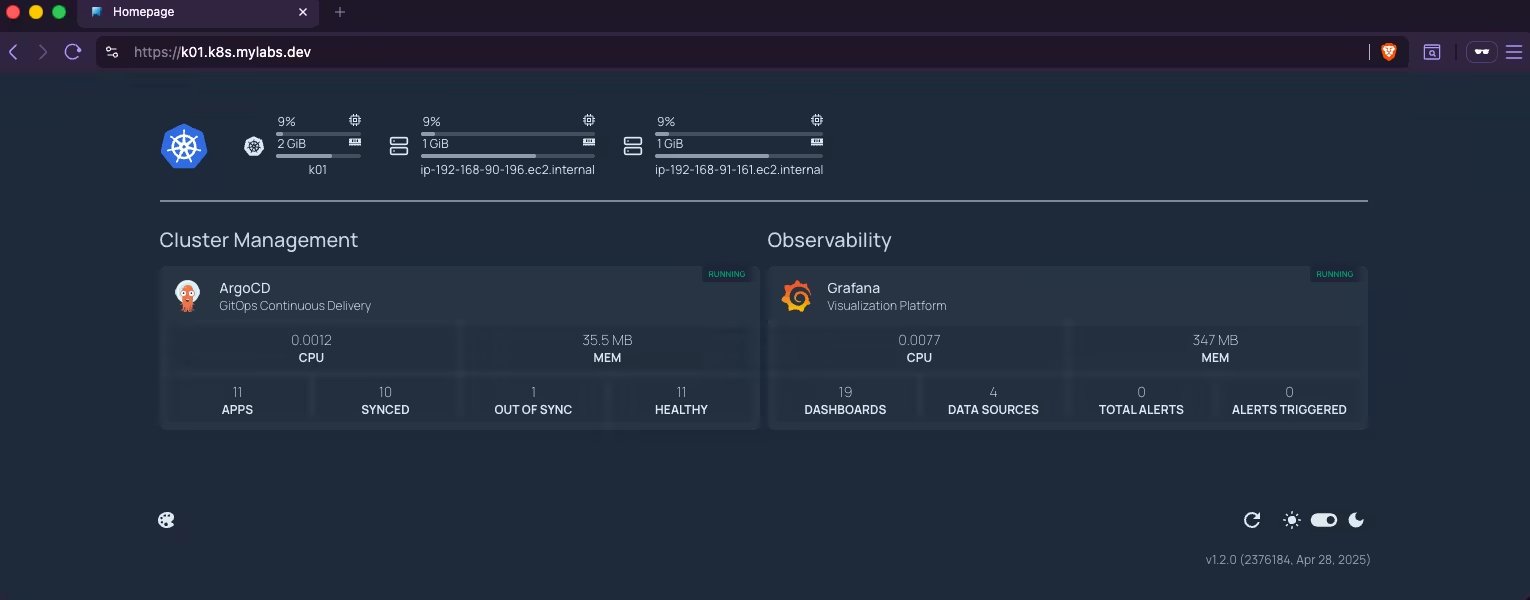 Homepage dashboard
ArgoCD Screenshot:
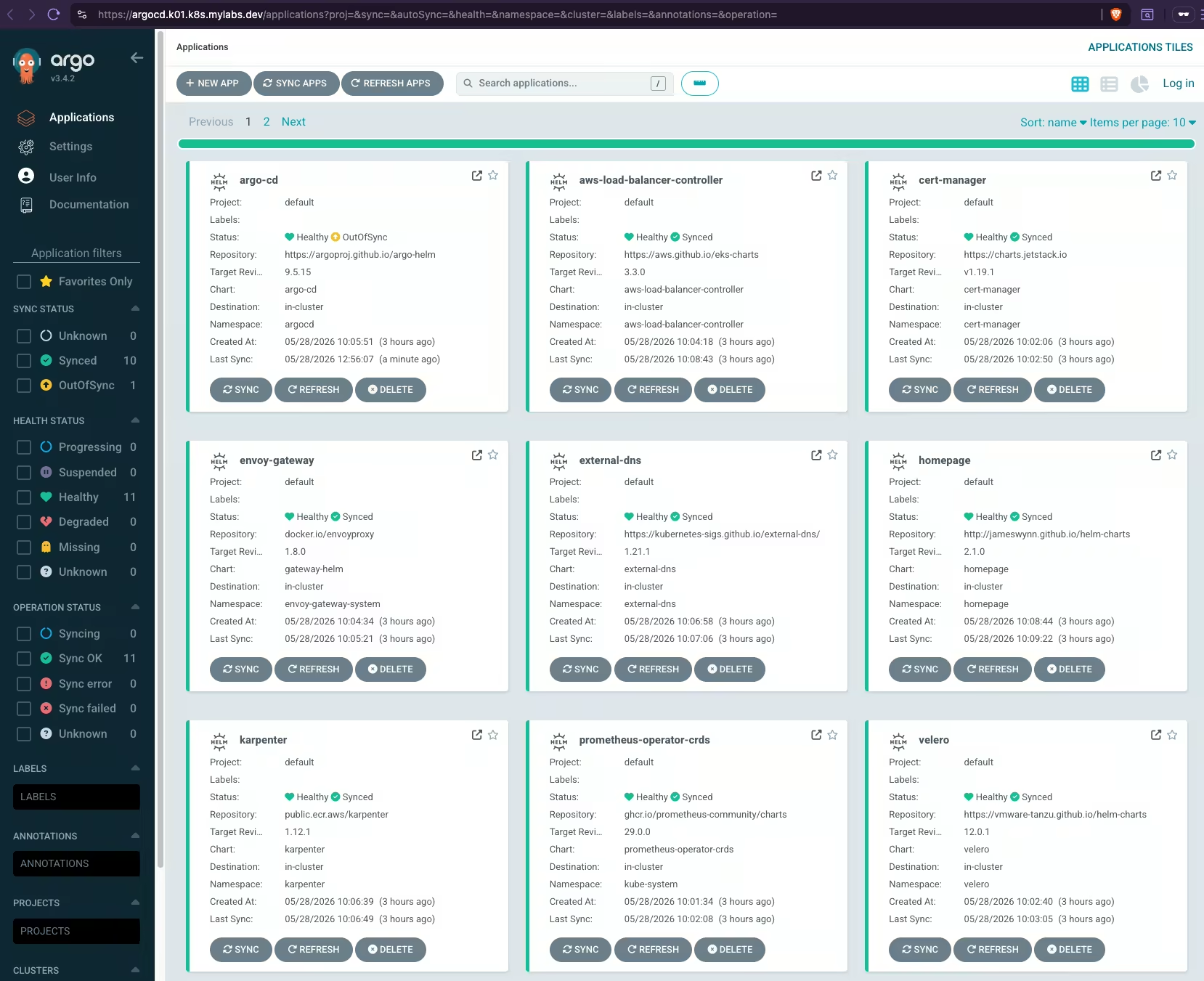 Argo CD dashboard showing deployed applications
Clean-up
Remove all deployed resources and the EKS cluster.

Set environment variables:
1
2
3
4
5
6
7
export AWS_REGION="${AWS_REGION:-us-east-1}"
export CLUSTER_FQDN="${CLUSTER_FQDN:-k01.k8s.mylabs.dev}"
export CLUSTER_NAME="${CLUSTER_FQDN%%.*}"
export TMP_DIR="${TMP_DIR:-${PWD}/tmp}"
export KUBECONFIG="${KUBECONFIG:-${TMP_DIR}/${CLUSTER_FQDN}/kubeconfig-${CLUSTER_NAME}.conf}"
mise use aws@2.35.2 eksctl@0.227.0 kubectl@1.36.1 velero@1.18.1
aws eks update-kubeconfig --region "${AWS_REGION}" --name "${CLUSTER_NAME}" --kubeconfig "${KUBECONFIG}" || true
Stop Karpenter from launching additional nodes and remove Envoy Gateway to release the AWS Load Balancer:
1
2
kubectl delete gateway eg -n envoy-gateway-system || true
kubectl delete application -n argocd karpenter || true
Back up the production certificate only if it was actually issued or renewed by cert-manager (not merely restored from a previous backup). The presence of a CertificateRequest resource proves that cert-manager contacted Let’s Encrypt — Velero does not back up or restore CertificateRequest resources:
1
2
3
4
5
6
7
8
9
10
11
12
13
14
15
16
17
18
19
20
if kubectl get certificaterequest -n cert-manager -l letsencrypt=production -o name 2> /dev/null | grep -q .; then
  kubectl apply -f - << EOF
apiVersion: velero.io/v1
kind: Backup
metadata:
  name: cert-manager-production
  namespace: velero
spec:
  ttl: 2160h
  includedNamespaces:
    - cert-manager
  includedResources:
    - certificates.cert-manager.io
    - secrets
  labelSelector:
    matchLabels:
      letsencrypt: production
EOF
  echo "👉 Production cert-manager certificates backed up with Velero"
fi
Disassociate a Route 53 Resolver query log configuration from an Amazon VPC:
1
2
3
4
5
6
7
8
for RESOLVER_QUERY_LOG_CONFIGS_ID in $(aws route53resolver list-resolver-query-log-configs --query "ResolverQueryLogConfigs[?contains(DestinationArn, '/aws/eks/${CLUSTER_NAME}/cluster')].Id" --output text); do
  RESOLVER_QUERY_LOG_CONFIG_ASSOCIATIONS_RESOURCEID=$(aws route53resolver list-resolver-query-log-config-associations --filters "Name=ResolverQueryLogConfigId,Values=${RESOLVER_QUERY_LOG_CONFIGS_ID}" --query 'ResolverQueryLogConfigAssociations[].ResourceId' --output text)
  if [[ -n "${RESOLVER_QUERY_LOG_CONFIG_ASSOCIATIONS_RESOURCEID}" ]]; then
    echo "*** Disassociating Resolver query log config: ${RESOLVER_QUERY_LOG_CONFIGS_ID} from resource: ${RESOLVER_QUERY_LOG_CONFIG_ASSOCIATIONS_RESOURCEID}"
    aws route53resolver disassociate-resolver-query-log-config --resolver-query-log-config-id "${RESOLVER_QUERY_LOG_CONFIGS_ID}" --resource-id "${RESOLVER_QUERY_LOG_CONFIG_ASSOCIATIONS_RESOURCEID}"
    sleep 5
  fi
done
Clean up AWS Route 53 Resolver query log configurations:
1
2
3
4
for AWS_CLUSTER_ROUTE53_RESOLVER_QUERY_LOG_CONFIG_ID in $(aws route53resolver list-resolver-query-log-configs --query "ResolverQueryLogConfigs[?Name=='${CLUSTER_NAME}-vpc-dns-logs'].Id" --output text); do
  echo "*** Removing Route 53 Resolver query log config: ${AWS_CLUSTER_ROUTE53_RESOLVER_QUERY_LOG_CONFIG_ID}"
  aws route53resolver delete-resolver-query-log-config --resolver-query-log-config-id "${AWS_CLUSTER_ROUTE53_RESOLVER_QUERY_LOG_CONFIG_ID}"
done
Remove any remaining EC2 instances provisioned by Karpenter (if they still exist):
1
2
3
4
for EC2 in $(aws ec2 describe-instances --filters "Name=tag:kubernetes.io/cluster/${CLUSTER_NAME},Values=owned" "Name=tag:karpenter.sh/nodepool,Values=*" Name=instance-state-name,Values=running --query "Reservations[].Instances[].InstanceId" --output text); do
  echo "*** Removing Karpenter EC2: ${EC2}"
  aws ec2 terminate-instances --instance-ids "${EC2}"
done
Remove the EKS cluster and its created components:
1
2
3
if eksctl get cluster --name="${CLUSTER_NAME}"; then
  eksctl delete cluster --name="${CLUSTER_NAME}" --force
fi
Remove the Route 53 DNS records from the DNS Zone:
1
2
3
4
5
6
7
8
9
10
11
CLUSTER_FQDN_ZONE_ID=$(aws route53 list-hosted-zones --query "HostedZones[?Name==\`${CLUSTER_FQDN}.\`].Id" --output text)
if [[ -n "${CLUSTER_FQDN_ZONE_ID}" ]]; then
  echo "*** Removing Route 53 DNS records from zone: ${CLUSTER_FQDN_ZONE_ID}"
  aws route53 list-resource-record-sets --hosted-zone-id "${CLUSTER_FQDN_ZONE_ID}" | jq -c '.ResourceRecordSets[] | select (.Type != "SOA" and .Type != "NS")' |
    while read -r RESOURCERECORDSET; do
      aws route53 change-resource-record-sets \
        --hosted-zone-id "${CLUSTER_FQDN_ZONE_ID}" \
        --change-batch '{"Changes":[{"Action":"DELETE","ResourceRecordSet": '"${RESOURCERECORDSET}"' }]}' \
        --output text --query 'ChangeInfo.Id'
    done
fi
Delete Instance profile which belongs to Karpenter role:
1
2
3
4
5
6
7
if AWS_INSTANCE_PROFILES_FOR_ROLE=$(aws iam list-instance-profiles-for-role --role-name "KarpenterNodeRole-${CLUSTER_NAME}" --query 'InstanceProfiles[].{Name:InstanceProfileName}' --output text); then
  if [[ -n "${AWS_INSTANCE_PROFILES_FOR_ROLE}" ]]; then
    echo "*** Removing instance profile: ${AWS_INSTANCE_PROFILES_FOR_ROLE} from role: KarpenterNodeRole-${CLUSTER_NAME}"
    aws iam remove-role-from-instance-profile --instance-profile-name "${AWS_INSTANCE_PROFILES_FOR_ROLE}" --role-name "KarpenterNodeRole-${CLUSTER_NAME}"
    aws iam delete-instance-profile --instance-profile-name "${AWS_INSTANCE_PROFILES_FOR_ROLE}"
  fi
fi
Remove the CloudFormation stacks:
1
2
3
4
5
aws cloudformation delete-stack --stack-name "${CLUSTER_NAME}-route53-kms"
aws cloudformation delete-stack --stack-name "${CLUSTER_NAME}-karpenter"
aws cloudformation wait stack-delete-complete --stack-name "${CLUSTER_NAME}-route53-kms"
aws cloudformation wait stack-delete-complete --stack-name "${CLUSTER_NAME}-karpenter"
aws cloudformation wait stack-delete-complete --stack-name "eksctl-${CLUSTER_NAME}-cluster"
Remove volumes and snapshots related to the cluster (as a precaution):
1
2
3
4
5
6
7
8
9
10
for VOLUME in $(aws ec2 describe-volumes --filter "Name=tag:KubernetesCluster,Values=${CLUSTER_NAME}" "Name=tag:kubernetes.io/cluster/${CLUSTER_NAME},Values=owned" --query 'Volumes[].VolumeId' --output text); do
  echo "*** Removing Volume: ${VOLUME}"
  aws ec2 delete-volume --volume-id "${VOLUME}"
done

# Remove EBS snapshots associated with the cluster
for SNAPSHOT in $(aws ec2 describe-snapshots --owner-ids self --filter "Name=tag:Name,Values=${CLUSTER_NAME}-dynamic-snapshot*" "Name=tag:kubernetes.io/cluster/${CLUSTER_NAME},Values=owned" --query 'Snapshots[].SnapshotId' --output text); do
  echo "*** Removing Snapshot: ${SNAPSHOT}"
  aws ec2 delete-snapshot --snapshot-id "${SNAPSHOT}"
done
Remove the CloudWatch log group:
1
2
3
4
if [[ "$(aws logs describe-log-groups --query "logGroups[?logGroupName==\`/aws/eks/${CLUSTER_NAME}/cluster\`] | [0].logGroupName" --output text)" = "/aws/eks/${CLUSTER_NAME}/cluster" ]]; then
  echo "*** Removing CloudWatch log group: /aws/eks/${CLUSTER_NAME}/cluster"
  aws logs delete-log-group --log-group-name "/aws/eks/${CLUSTER_NAME}/cluster"
fi
Remove the ${TMP_DIR}/${CLUSTER_FQDN} directory:
1
2
3
4
5
6
7
8
9
10
if [[ -d "${TMP_DIR}/${CLUSTER_FQDN}" ]]; then
  for FILE in "${TMP_DIR}/${CLUSTER_FQDN}"/{kubeconfig-${CLUSTER_NAME}.conf,{aws-cf-route53-kms,aws-s3,cloudformation-karpenter,eksctl-${CLUSTER_NAME},k8s-argocd-{argo-cd,aws-load-balancer-controller,cert-manager,external-dns,homepage,envoy-gateway,karpenter,prometheus-operator-crds,velero,victoria-logs-single,victoria-metrics-k8s-stack},k8s-{cert-manager-certificate-production,cert-manager-clusterissuer-production,envoy-gateway-gateway,grafana-httproute,homepage-httproute,karpenter-nodepool,scheduling-priorityclass,storage-snapshot-storageclass-volumesnapshotclass}}.yml}; do
    if [[ -f "${FILE}" ]]; then
      rm -v "${FILE}"
    else
      echo "File not found: ${FILE}"
    fi
  done
  rmdir "${TMP_DIR}/${CLUSTER_FQDN}"
fi
Enjoy … 😉